K2 Comment reporting works like this.
You select if you want to allow comment reporting, this places a "report" link within the comments that are posted. Once the link is clicked a modal is open to allow a report to be sent to admin so that they can action on the comment.
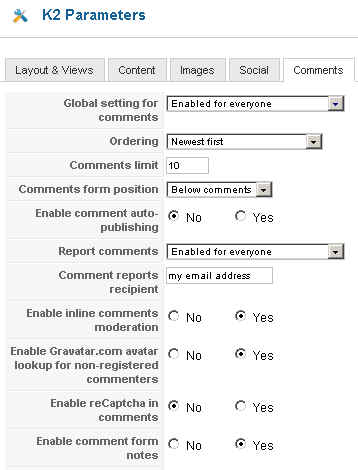
The associated parameters functions in the Comments tab of K2 global parameters are:
- Report comments. Select if you wish reporting to be disabled, enabled to everyone or only registered users.
- Comment reports recipient: Enter the email address of the person that will be notified when a comment has been reported.
This will not notify anyone when a comment is posted.
It will only notify when an already published comment is being report, due to spam, bad language etc.
If you want to be notified when a new comment is added, then you could use our K2 MultiNotify.
This will notify any selected admins when a new comment is submitted and control if it needs to be approved before publishing. On the front end, you can allow visitors to subscribe to the comments, so that they are notified when a new comment is added, they do not need to be a registered user.
In addition to comments, admins can be notified when a new item is submitted so they can then approve it. Again, users can subscribe to a category and will be notified when the item is published.
These same functions can be done per author too.
Finally, all three of these notifications can be controlled global, per category and at item levels!!
And one last things :) The subscription to comments, cats and authors can be placed anywhere on the web page, simply by specifying a class or id and selecting to load it before, after it or above or below the container.
Please feel free to check out
K2Joom
for more information, screenshots or check out the blog link to see the category subscription displayed in the right column, outside of K2.
Simon