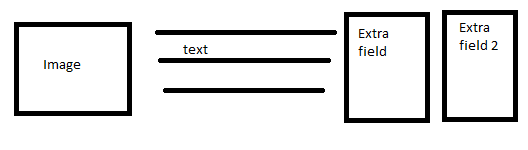
I am actually building a template in a similar manner.
Since I do not know your level of php or css coding, I will throw up some of the code and if you have problems putting into your template, you can repost...
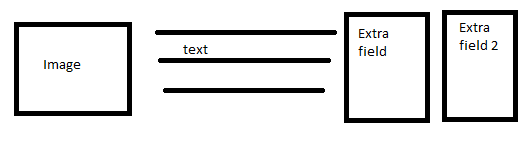
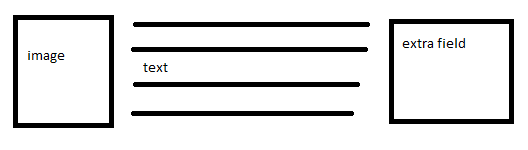
1. Image aligned via float: left left in css - do not float: clear after this
2. Not sure if you are using a DIV to align next to the image.. if so, you float: left as well. Do not clear before or after this step
3. Extra field 1 also float left and no clear afterward
4. Extra field 2 float left and then you can clear afterward.
Optionally, you can float:right the 2 extra fields without clearing in between.
- Consider FLOAT like building columns and rows... without clearing, another column is formed and a new row if you do clear.
Okay.. so now the code:
You said you already had the image, text and field 1 set.. It sounds like, though you have not broken down the fields individually... here is how I did it based on research on this board and help through other posts:
You start with creating the arrays.. one for using the IDs and I found it helpful to create one for the names too:
Aaron
14 years 8 months ago #62954
Uldis,
Why don't you post your category_item.php.. I will take a peek..
Aaron :)
Aaron
14 years 8 months ago #62957
Uldis,
So you are correct that you do not have to create another extra field group but you could.. this code only goes by the ID and each extra field ID is unique regardless of the field group...
So... if you want to disable the extra field in item.php you have to duplicate the code in my first post in item.php and break it all down by each extra field. To "disable" an extra field, you just do not need to put it in the code...
It looks like the change you made removed the name (label) which is fine... you can remove the section "Call to prepare extra field labels" in the array code. You do not want to change the "Call to prepare extra field IDs" section though.
To use this for a particular category, just select this template for that category. Any tweaks or changes you need to make can be done in a new template and assigned according to your need.
I think I answered all the followup questions... hope this helps!
Aaron :)
Uldis
Topic Author
14 years 8 months ago #62958
Yes, thank you, this has been extremely helpful!
Odin Mayland
14 years 7 months ago #62959
I am trying to create a row of extra fields so that in category view it appears to be a table of products.
I have pasted your code into category_item.php
The extrafields show up in the category view but I get a "Warning: Invalid argument supplied for foreach() in" for lines:
foreach($this->item->extra_fields as $itemid)
and
foreach($this->item->extra_fields as $itemlabel)
using k2.5.3
Aaron
14 years 6 months ago #62960
Sorry I had not seen your post before today (I wish this site would use a forum application that notifies users...).. I have been struggling with the same error since upgrading my staging site to J!2.5.4 and K2v2.5.6. Did you find an answer to the error?
Aaron :)