Do you want to include google maps in your k2 listings? I noticed a few people requesting it, and since so I dug in and figured it out for myself, I figured I would share it with the community. So here it is. I don't have a demo because the site hasn't been released yet, but this should work just fine for everybody. Also, since we can't add in code to this forum :( i have attached the code as .txt files.
Goal: Automatically output a google map based on extra fields right underneath the item's body text.
Solution: Call the fields manually into the template and plug them into a google maps iframe
Step 1: Create extra fields for address, city, state, and zipcode
Step 2: Create a few sample items with the address info filled out for testing
Step 3: Open up components/com_k2/templates/default/item.php
Step 4: Around line 239, you will find a clearing div directly below the output for the introtext/full text that looks like this (code simplified because this forum won't allow it): div class=clr....
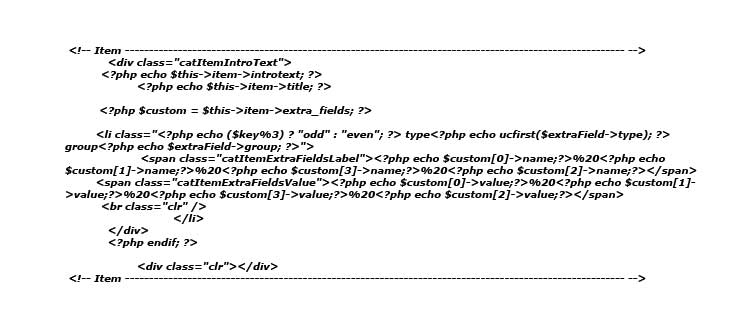
Step 5: Below the clearing div, you need to define the custom variable you will be using to grab the custom fields. Add in the php line from my first attachment. You can actually define that anywhere in the code as long as it is above the next step...
Step 6: Add in the div and google maps code I snagged from some random site and call each of your extra fields into it in the correct place. In this case, the number in square brackets [0] is the first field in the group, [1] is the second, etc. In my case, 0,1,3, and 4 corresponded to address, city, state, and zipcode. You need to adjust these numbers based on the ordering of your extra fields. See second attachment.
Step 7: Test it out to make sure it works. Then, adjust the width and height as needed (they appear twice in the code, once each for the iframe, and once each for the map itself). You can also use some css to adjust the googleMap div that contains the iframe.
Enjoy! My final item.php is attached as a .txt file too, check out lines 240-245.
Goal: Automatically output a google map based on extra fields right underneath the item's body text.
Solution: Call the fields manually into the template and plug them into a google maps iframe
Step 1: Create extra fields for address, city, state, and zipcode
Step 2: Create a few sample items with the address info filled out for testing
Step 3: Open up components/com_k2/templates/default/item.php
Step 4: Around line 239, you will find a clearing div directly below the output for the introtext/full text that looks like this (code simplified because this forum won't allow it): div class=clr....
Step 5: Below the clearing div, you need to define the custom variable you will be using to grab the custom fields. Add in the php line from my first attachment. You can actually define that anywhere in the code as long as it is above the next step...
Step 6: Add in the div and google maps code I snagged from some random site and call each of your extra fields into it in the correct place. In this case, the number in square brackets [0] is the first field in the group, [1] is the second, etc. In my case, 0,1,3, and 4 corresponded to address, city, state, and zipcode. You need to adjust these numbers based on the ordering of your extra fields. See second attachment.
Step 7: Test it out to make sure it works. Then, adjust the width and height as needed (they appear twice in the code, once each for the iframe, and once each for the map itself). You can also use some css to adjust the googleMap div that contains the iframe.
Enjoy! My final item.php is attached as a .txt file too, check out lines 240-245.