Hi Paul,
Thank you for your reply, I will try to handle that tomorrow morning and give you a feedback about the results.
Cheers,
Bill
Paul said:
Hello, see if this helps, it looks like it can be 1 of 2 things, since that icon is from joomla im thinking its a joomla article and not K2. try this first-
go to your admin. backend panel
go to "Global Setting"
hit the tab for "System"
in the catagory- "User Settings" got to "New User Registration Type" check to see if its "Registered" on the drop down list.
Next go to the category "Media Settings"
go to Minimum User Level for Media Manager"- check to make sure its not on "Registered"- select Editor or Publisher
click "SAVE" or "APPLY"
Now the frontend users who are registered will not be able to see that icon or edit articles- only the group you selected.
if im wrong check this- this affects the K2 articles-
go to your admin. backend panel
go to components - K2
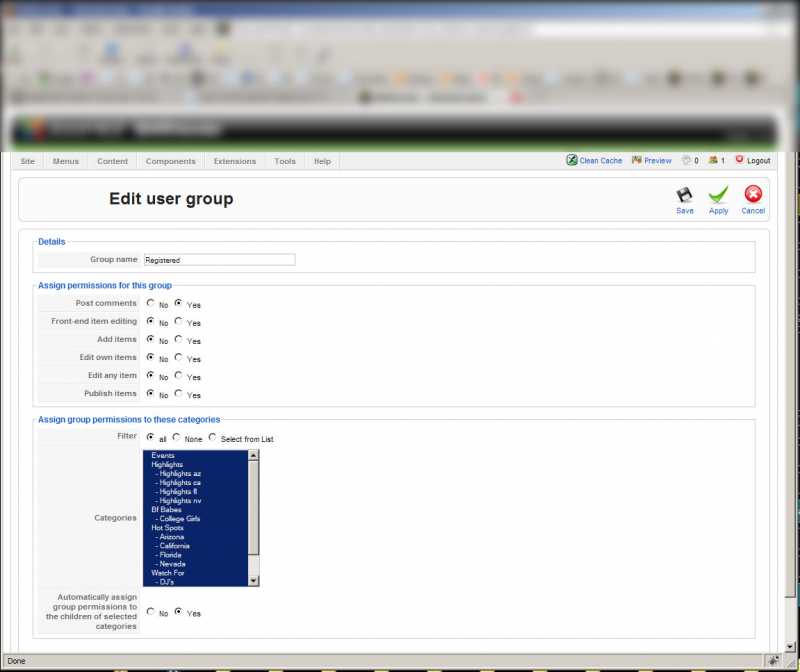
in the K2 dashboard go to "User Groups"
find "Registered"
open that up and go to the heading "Assign Permissions for this group"
you will find "Front end item editing"
click on "NO" and hit "Save"