

hi guys, i try to make a different color the first word of the itemTitle (item.php) with this jquery code:

13 years 3 months ago #116146
You can try this code here, see if it helps - blog.codez.in/jquery-css-styling-first-word-of-a-text-differently/jquery/2010/08/23
K2 Rocks \m/

Topic Author
13 years 3 months ago #116147
i've tryed too this solution but always the same problem with space :\
13 years 3 months ago #116148
is there any css value that is messing the spacing ? like word-spacing or letter-spacing. Can share the link to your site ?
K2 Rocks \m/
Topic Author
13 years 3 months ago #116149
i have in local, i put the code html and css
HTML becomes:
HTML becomes:
13 years 3 months ago #116150
You mentioned that you want to change the first word to a different color, but this code sets the background and font color of the entire h2.
Why are you using <strong></strong> ?
You should be using something like <span></span> for the js
Your html output should be
Why are you using <strong></strong> ?
You should be using something like <span></span> for the js
Your html output should be
K2 Rocks \m/
Topic Author
13 years 3 months ago #116151
I've used <strong> for test.
The problem there isn't strong, span or other, the problem is the k2 make a space and the js code don't work and the output is:
The problem there isn't strong, span or other, the problem is the k2 make a space and the js code don't work and the output is:
13 years 3 months ago #116152
Have you tried by just using <h2> only or try <h2 class="mytitle"> ?
K2 Rocks \m/
Topic Author
13 years 3 months ago #116153
yes i did..
always the same output:
always the same output:
13 years 3 months ago #116154
Here's what i did, and it worked like a charm :)
My JS
My JS
K2 Rocks \m/
Topic Author
13 years 3 months ago #116155

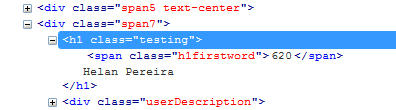
Topic Author
13 years 3 months ago #116158
The script don't work only in the K2 Item title:
13 years 3 months ago #116159
Try changing the existing code to just this, remove the rest
K2 Rocks \m/
Topic Author
13 years 3 months ago #116160
i've tryed.. the problem is the php variable:
13 years 3 months ago #116161
It's not the variable, you're trying to achieve this at category item listings ? I tried the same and it didn't work because of the link tag, but if you try this on item page, it works as there is no link to it.
K2 Rocks \m/
Topic Author
13 years 3 months ago #116162
I'm trying in item page.. (item.php).. and still not work.. :(
Log in or create an account to reply.