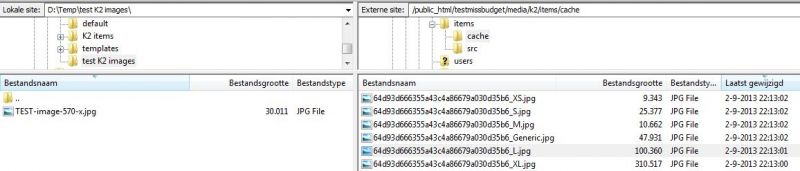


When optimising my web site for speed I noticed that the K2 images are much larger then I have original uploaded into K2.
I saved with PhotoShop (option Save for web) a jpg image with size 570px. The same size as set in the General K2 settings for a Large image. The result was a 30Kb image.
When uploading this image into K2 (under tab image at K2 item), the image stored in the src folder (/media/k2/items/src) has now a size of 310Kb. The cache folder which contains the pre-formatted images (/media/k2/items/cache), a Large image is generated with a size of 100Kb (~3x larger).
I have tried different images with different px/dpi but this seems to make no difference to reduce the size of the Large image. Is there any way to influence the size? What kind of algorithm for sizing images by K2?