JoomlaWorks
Go!
Member Dashboard
Home
Extensions
Commercial
Frontpage Slideshow
Simple Image Gallery Pro
Free
K2
AllVideos
DISQUS Comments for Joomla!
IAKI (Import As K2 Image)
Quick Menu (for Joomla 4)
Simple Image Gallery
Simple RSS Feed Reader
Free On Github
Akismet for Kunena
Fill It Up
K2 Example Plugin
K2 Links for JCE
Rebuild K2 Image Cache (CLI utility for K2)
URL Normalizer
User Extended Fields for K2
Demos
Joomla Extension Demos
WordPress Plugin Demos
Labs
Joomla 3.x UTD
Web Apps
JSON 2 JSONP
Feed Reader (bookmarklet)
Device Info
Support
Documentation for Joomla Extensions
AllVideos
Frontpage Slideshow
Simple Image Gallery
Simple Image Gallery Pro
Get Help
Community Forum
Recent Topics
Categories
Create free account
Help Desk
Contact Us
About
Blog
Company
License & Terms of Service
Privacy Policy
My Account
COMMUNITY FORUM
Community Forum
Search the forum
Index
Recent Topics
Search
Log in
Username
Password
Log in
Remember me
Forgot your password?
Forgot your username?
Create an account
Forum
K2 Community Forum
Comunidad hispana oficial de K2
how to disabled menu
how to disabled menu
Comunidad hispana oficial de K2
3 replies
1219 views
sunny
6 years 5 days ago
#177401
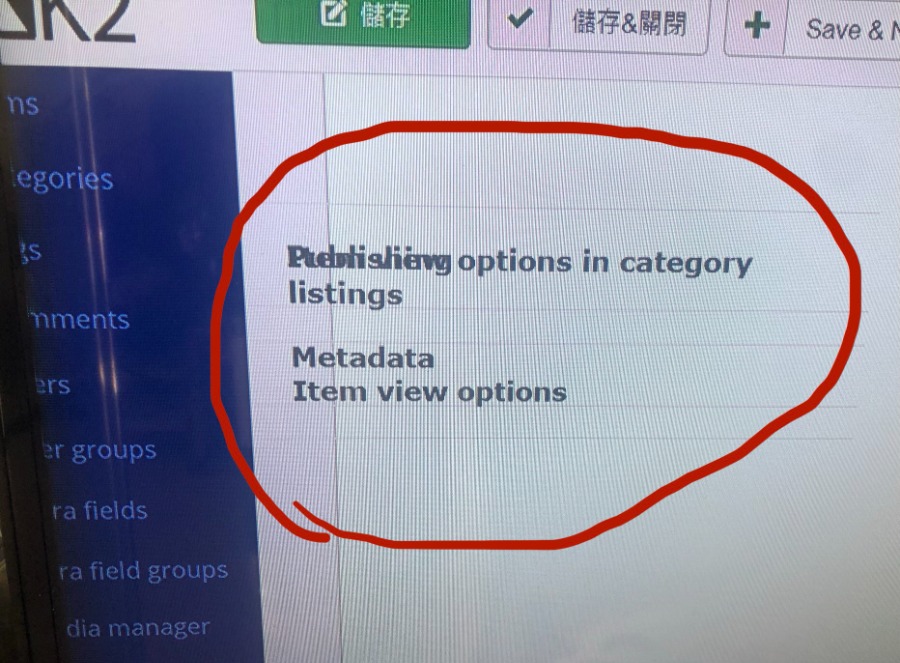
how to disabled menu ?
IMG_2302.jpg
161 KB
Copy link
JoomlaWorks
Admin
6 years 5 days ago
#177404
Clear your browser's cache (or check the admin with a private window). If that doesn't solve the issue, then you have some 3rd party extension (K2 or system) that breaks K2's output.
Copy link
oscar
6 years 5 days ago
#177422
sunny wrote:
how to disabled menu ?
Alternate solution:
www.joomlaworks.net/forum/k2-en/55790-item-and-category-adm-lost-configuration-and-functions
Copy link
JoomlaWorks
Admin
6 years 5 days ago
#177427
jQuery UI's days are numbered either way :)
Copy link
Log in
or
create an account
to reply.