Keyword

Advanced Search

Search Results (Searched for: k2 Tag)

  • Seyedreza Ghafarianzadeh
  • Seyedreza Ghafarianzadeh's Avatar
28 Apr 2016 14:34
Issues with Tags Bar - (Back End - Add a new Item) was created by Seyedreza Ghafarianzadeh

Issues with Tags Bar - (Back End - Add a new Item)

Category: English K2 Community

Hello guys,

Since the upgrade to joomla 3.5.1 and K2 2.7.0 I encountered an issue in the back end.

In the "add a new item" section, whenever I add more than a line of tags, the second line of tags goes out of border and become un-clickable!


Do you have any idea what should I do?

Cheers,
Rez
  • Krikor Boghossian
  • Krikor Boghossian's Avatar
28 Apr 2016 14:11
Replied by Krikor Boghossian on topic k2 displays two rss icons on top of each other

k2 displays two rss icons on top of each other

Category: English K2 Community

Hello,

There has been a proposed change in the DEV version so 3rd party scripts are not printed in <meta> tags.
github.com/getk2/k2/pull/311/files

As for the feed please paste this rule into your template's css file
div.k2FeedIcon a:before, a.ubUserFeedIcon:before { display: none; }
  • Krikor Boghossian
  • Krikor Boghossian's Avatar
26 Apr 2016 14:21
Replied by Krikor Boghossian on topic Issue with K2 Tags and Menu Item

Issue with K2 Tags and Menu Item

Category: English K2 Community

Nice to hear that the issue has been resolved Jared :)
  • James Rocks
  • James Rocks's Avatar
25 Apr 2016 23:21 - 25 Apr 2016 23:23
Image Sizes In Articles was created by James Rocks

Image Sizes In Articles

Category: English K2 Community

Hi,

I'm getting a problem with image sizes in my articles in that the images embedded in the articles are varying in size. I discovered this when using my "innovative" featured page idea using tags (ahem) in that using the tagged articles list, the article displayed correctly but using the category list it doesn't ... the image is huge.

Here are some screenshots:

In Editor:


Tagged List:


Category List:


Have a look at the front page of my my website ( An Aspiring Author's Journey ) and you'll see what I mean ... those images should be much, much smaller.

Any idea why?

Thx

James
  • Jared
  • Jared's Avatar
25 Apr 2016 23:12
Replied by Jared on topic Issue with K2 Tags and Menu Item

Issue with K2 Tags and Menu Item

Category: English K2 Community

I figured it out, kind of. After loading the K2 SH404SEF plugin (didn't realize there was one), then flushing the cache and everything, it's fixed!
  • Roman Lipatov
  • Roman Lipatov's Avatar
25 Apr 2016 22:18
Replied by Roman Lipatov on topic How to get tag name in tag itemlist?

How to get tag name in tag itemlist?

Category: English K2 Community
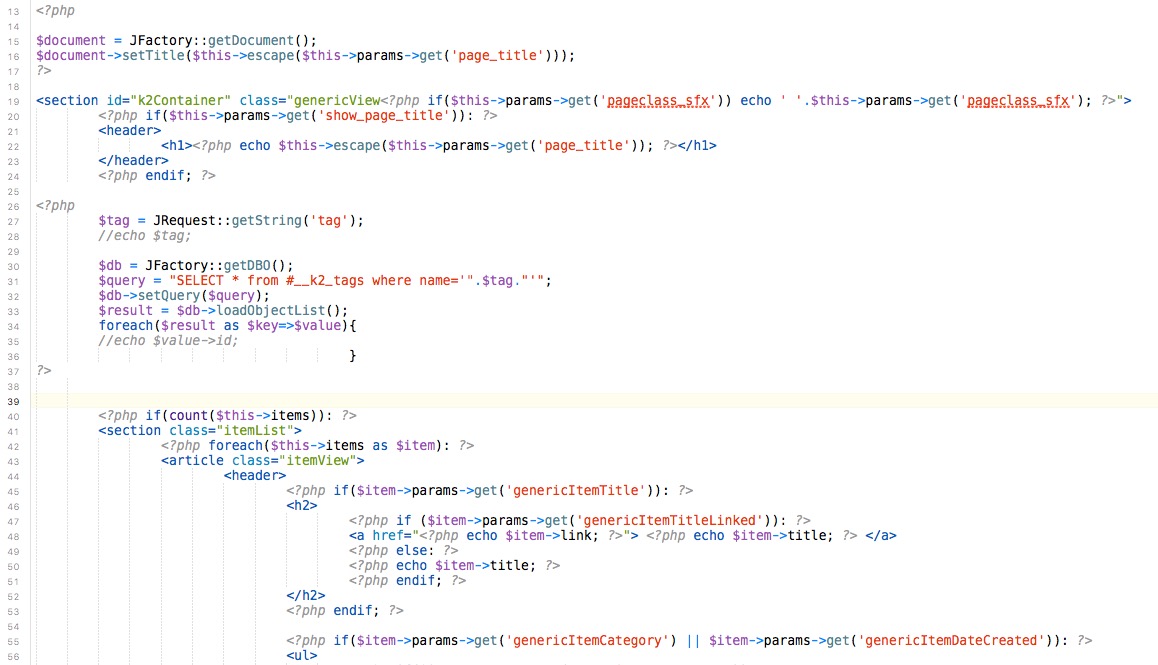
Hi Krikor,
I paste this code at the top.


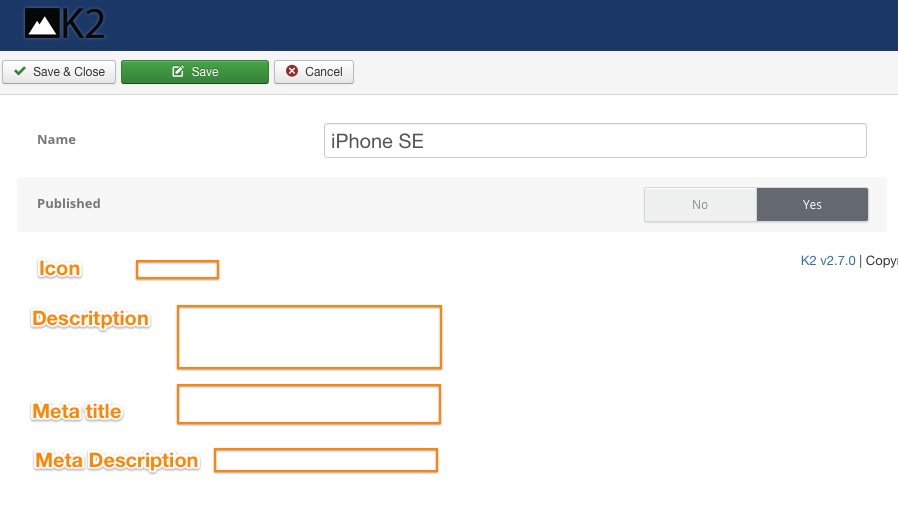
My idea is to add new columns in k2_tags mysql table - description, meta description, meta title, icon.

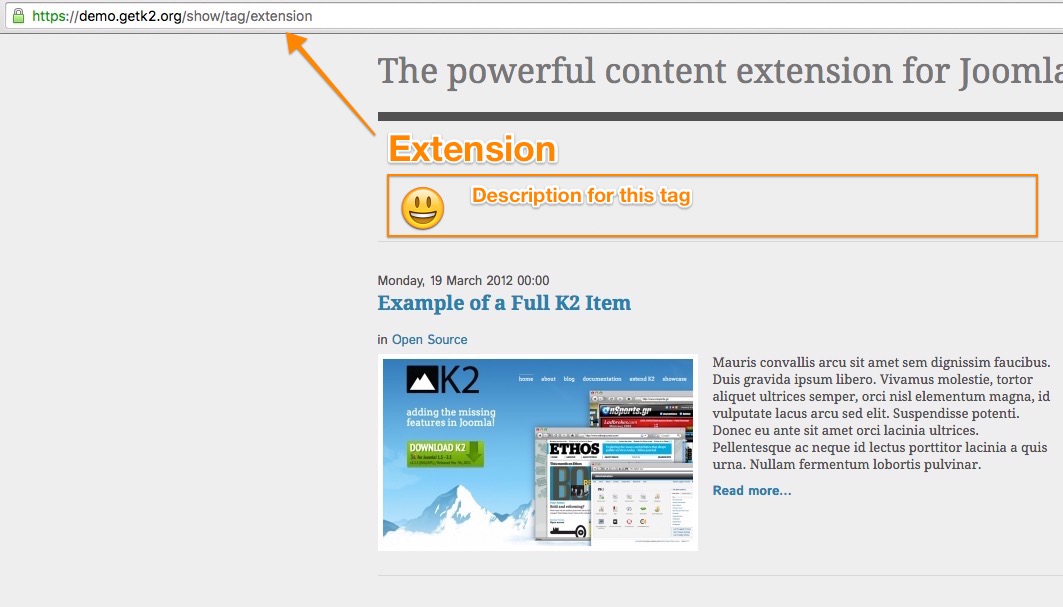
So, I will be able to build tags pages, that will looks same as categories.


I think, that this feature should be a part of K2...


But right now I trying to make it with hack, and I not sure, that code above is correct, and it will not work slow (I'm not programmer).

Thanks.
  • Krikor Boghossian
  • Krikor Boghossian's Avatar
25 Apr 2016 19:24
Replied by Krikor Boghossian on topic Auto introtext and tag stripping

Auto introtext and tag stripping

Category: English K2 Community

The override code has to be placed in the category-item.php file.
Info on locating and overriding the file can be found here:
getk2.org/documentation/tutorials/174-templating-with-k2-and-the-concepts-of-sub-templates

Now, If you choose a limit, ALL tags are being stripped. It is better to manually speficy an introtext manually using the read more or by using two separate editors.

To be specific, the best way to ensure that you have control over your content is to set an introtext manually and have the tags stiped in the Introtext HTML Cleanup options.

Finally if no introtext is being specified, then the entire text is treated as fulltext. I think this is the cause of the confusion.
  • Jared
  • Jared's Avatar
25 Apr 2016 17:36
Replied by Jared on topic Issue with K2 Tags and Menu Item

Issue with K2 Tags and Menu Item

Category: English K2 Community

I just tried purging the URLs and it didn't fix the issue.

I'm not using the redirect component.

Thanks!
  • Krikor Boghossian
  • Krikor Boghossian's Avatar
25 Apr 2016 12:06
Replied by Krikor Boghossian on topic Issue with K2 Tags and Menu Item

Issue with K2 Tags and Menu Item

Category: English K2 Community

Can you try purging your URLs?
Are you using the redirect component?
  • James Rocks
  • James Rocks's Avatar
23 Apr 2016 19:06 - 23 Apr 2016 19:08
Replied by James Rocks on topic New to K2: Featured Article Page

New to K2: Featured Article Page

Category: English K2 Community

Hi again Krikor,

Turns out I had already found those videos on YouTube and I didn't really get on with them ... I found her presentation style too fast and the subject material (the actual website itself) something of a distraction. Just one of those things I guess ... I am reviewing the K2 site's other documentation though.

I am attempting to more-or-less duplicate Joomla's "featured article" capability but using K2 items as source ... under "normal" Joomla I can have several featured articles on my front page effectively giving a history of featured articles.

From what I can tell featured pages are pretty much impossible within K2 itself and I can find no way to include K2 articles on a "normal" Joomla featured article page. I checked that last by deleting my primary featured article in Joomla and checking that the K2 imported version was still in the K2 item list and that it was still classed as featured. I then checked my website to find that the article had gone which means the "normal" Joomla featured article page does not source from K2 items. Therefore K2 must have its own method of displaying featured articles or it can't do it at all and the latter seems odd because K2 items have a "featured" checkbox.

There doesn't appear to be a K2 menu system, you simply attach a K2 category or whatever to a Joomla item so the next step was to check what kinds of K2 "Menu Item Type" I could have, these are K2 item
  • Categories: This could work if I was willing to have one of my categories only as my featured items for instance my "News & Progress" category.
  • Item: This would work if I had only one featured article at any one time (this was pretty much how I had originally envisaged featured articles)
  • Item edit form: Wouldn't work at all.
  • Latest items from (one or more) users or categories: Might work but doesn't seem to offer what I'd need.
  • Tag: This has potential if I was willing to create a "featured" tag and use that tag as the filter for this page.
  • User page (blog): Wouldn't really work at all.

My limited research indicates that K2 doesn't have a true featured article page and that, if I want to stick with K2 (which I do), my best bet would be to use the tag version. I have tested that and it does work.

I would probably still prefer a proper featured page system though.

James
  • Roman Lipatov
  • Roman Lipatov's Avatar
23 Apr 2016 15:22
Replied by Roman Lipatov on topic How to get tag name in tag itemlist?

How to get tag name in tag itemlist?

Category: English K2 Community
OK, it seems I got it.
But I need your mind about this code.

I think it is too big to just get the ID value...
<?php $tag = JRequest::getString('tag'); echo $tag; $db = JFactory::getDBO(); $query = "SELECT * from #__k2_tags where name='".$tag."'"; $db->setQuery($query); $result = $db->loadObjectList(); foreach($result as $key=>$value){ echo $value->id; } ?>
  • Roman Lipatov
  • Roman Lipatov's Avatar
23 Apr 2016 15:13
Replied by Roman Lipatov on topic How to get tag name in tag itemlist?

How to get tag name in tag itemlist?

Category: English K2 Community
Can get it :(

I trying this code to get tag ID, but it does not work...
<?php $tag = JRequest::getString('tag'); echo $tag; $dbc=&JFactory::getDBO(); $sql="select id from k2_tags where name='".$tag."';"; $dbc->setQuery($sql); echo $dbc; ?>
  • Jared
  • Jared's Avatar
22 Apr 2016 23:15 - 22 Apr 2016 23:15
Issue with K2 Tags and Menu Item was created by Jared

Issue with K2 Tags and Menu Item

Category: English K2 Community

I have a strange issue that I'm not able to fix out regarding tags.

Here is an example. When viewing this page:
www.jamesallenlibrary.com/authors/james-allen/mastery-of-destiny/deeds-character-and-destiny

It displays correctly and the menu item "Read Online" is highlighted, which is fine. However, when you click on a tag (which I have renamed to "Topics"), some tags are causing an issue.

Clicking on "The Mastery of Destiny" takes you to this page and has the correct page title:
www.jamesallenlibrary.com/tag/the-mastery-of-destiny

Clicking on "Deeds" takes you to this page and has the incorrect page title. It has the title from the "Listen Online" menu item and the "Listen Online" menu item is highlighted.
www.jamesallenlibrary.com/tag/deeds

I'm not sure why tags would be showing up under that menu item. If I turn breadcrumbs on, "Listen Online" shows in the path as well.

I'm using SH404SEF. I've spent some time with this issue and can't figure out what is causing it. Any ideas?
  • trogladyte
  • trogladyte's Avatar
22 Apr 2016 17:07
Replied by trogladyte on topic Auto introtext and tag stripping

Auto introtext and tag stripping

Category: English K2 Community

Thanks Krikor. Where do I place that override code?

I'm still confused about how K2 works in regard introtext. It seems you're saying that it strip all HTML from the whole article if it's turned on. Yet, in the full text, <p>, <em> and more appear fine, but, in my case, it had completely removed <a href...> from the full text, and this was right at the bottom of a very long article, well away from the 150 word introtext cut off. So this action makes no logical sense.

I added a href to tags NOT to be stripped from introtext, and then the links appeared in full text. Again, this makes no sense. I was specifying tags not to be stripped in the introtext portion, not full text.

Lastly, though I have :

Introtext HTML Cleanup - Yes
HTML tags NOT to strip: p.em.a href

the p and em are now being stripped (since upgrading to Joomla 3.5.1) from introtext.

Basically, K2 does not seem to be performing its tasks as the labels and settings appear to say it should.
  • Krikor Boghossian
  • Krikor Boghossian's Avatar
22 Apr 2016 14:00
Replied by Krikor Boghossian on topic K2 tags generate wrong URLs

K2 tags generate wrong URLs

Category: English K2 Community

Unfortunately you will have to wait for v3, where you can manually set a tag's alias or you can map these tags into a menu item.
  • Krikor Boghossian
  • Krikor Boghossian's Avatar
22 Apr 2016 13:58
Replied by Krikor Boghossian on topic What Happened to K2 3.0?

What Happened to K2 3.0?

Category: English K2 Community

@DSPE The front-end is not finalised, the core functionality is all there but I cannot guarantee it will play along nicely with extensions built specifically for older versions of K2.

I would not recommend using it in a production environment but if you want to give it a try you should use it in a staging server first before updating your site.

Should you run into any issues, feedback is really valuable to us.
Please report them at github.com/getk2/k2-v3-dev-build
  • Krikor Boghossian
  • Krikor Boghossian's Avatar
22 Apr 2016 13:53
Replied by Krikor Boghossian on topic Auto introtext and tag stripping

Auto introtext and tag stripping

Category: English K2 Community

Introtext word limit, by default will strip all tags so there won't be any unclosed HTML tags (broken layout).

You can apply a word limit via a code snippet in your overrides to enforce a wordlimit without stripping the tags.

The functions you need to use are
K2HelperUtilities::characterLimit or,
K2HelperUtilities::wordLimit, an example with the item's title can be found here: www.joomlaworks.net/forum/k2-en/17656-parameter-for-maximum-caracter-in-the-title#62142

As for the pagination, Each page will display the same set of leading/ primary/ secondary items etc..
  • Roman Lipatov
  • Roman Lipatov's Avatar
22 Apr 2016 13:18 - 22 Apr 2016 13:18
Replied by Roman Lipatov on topic How to display comments on tags pages?

How to display comments on tags pages?

Category: English K2 Community

Hi Krikor.
No, native K2 comments work fine.
Thank you for reply.

I find way, how to make Jcomments working on tags pages and multi categories pages.


For tag pages
<?php $dbc=&JFactory::getDBO(); $sql="select count(*) from #__jcomments where object_group='com_k2' and object_id='".$item->id."';"; $dbc->setQuery($sql); $count = $dbc->loadResult(); if(!$count) { echo '<a href="' . $item->link . '#itemCommentsAnchor">Add First Comment</a>'; } else { echo '<a href="' . $item->link . '#itemCommentsAnchor">Comments (' . $count . ')</a>'; } ?> 

For multi categories pages replace all $item->link with $this-item->link
  • Ruud van Lent
  • Ruud van Lent's Avatar
21 Apr 2016 17:28 - 21 Apr 2016 17:30
Meta and OG description improvement was created by Ruud van Lent

Meta and OG description improvement

Category: English K2 Community

Hi,

first post here :)

I developed a Joomla! plugin that automatically adds Social Sharing buttons to top / bottom of articles. In last version I have added support for K2.

What the plugin does is add a script to the specified position of the article (or Item when in K2).
the script looks like this:
<script type="javascript/text>herecomesthejquerycode</script>

this works (almost) perfect.
Where this goes wrong is when the article has no meta description and K2 generates one from the intro- or full-text.
K2 uses the following code for this in file ./component/com_k2/views/item/view.html.php
 $metaDescItem = preg_replace("#{(.*?)}(.*?){/(.*?)}#s", '', $item->introtext.' '.$item->fulltext); $metaDescItem = strip_tags($metaDescItem); $metaDescItem = K2HelperUtilities::characterLimit($metaDescItem, $params->get('metaDescLimit', 150)); $document->setDescription(K2_JVERSION == '15' ? $metaDescItem : $metaDescItem);

The 'cullprit' is in the strip_tags function.
This strips the tags from the description but does not strip the code itself!
so <script type="javascript/text>herecomesthejquerycode</script> becomes herecomesthejquerycode

When posting that page on Facebook (and G+) the text that is being posted starts with "herecomesthejquerycode'... which is wrong :(

I have solved this with a simple regex. The new code in view.html.php will look like (line 2 is added):
 $metaDescItem = preg_replace("#{(.*?)}(.*?){/(.*?)}#s", '', $item->introtext.' '.$item->fulltext); $metaDescItem = preg_replace("/<script\b[^>]*>(.*?)<\/script>/is", '', $item->introtext.' '.$item->fulltext); $metaDescItem = strip_tags($metaDescItem); $metaDescItem = K2HelperUtilities::characterLimit($metaDescItem, $params->get('metaDescLimit', 150)); $document->setDescription(K2_JVERSION == '15' ? $metaDescItem : $metaDescItem);

What this code (second preg_replace) does is strip the <script...> and </script> tags AND everything (the script itself) in between :)

Hope this helps!
regards,
Ruud.
  • M DZ
  • M DZ's Avatar
21 Apr 2016 14:20
Replied by M DZ on topic K2 tags generate wrong URLs

K2 tags generate wrong URLs

Category: English K2 Community

They don't give, any kind of explanation, they just mention the issue, nothing more github.com/getk2/k2/issues/71

Character replacements doesn't work properly, they only way it works, is that it doesn't display tag words in items with special characters ion my language, which in Polish sometimes even changes the meaning.

It all seems, as a hopeless issue :(
Displaying 1281 - 1300 out of 6582 results.

Powered by Kunena Forum