Keyword

Advanced Search

Search Results (Searched for: k2 Tag)

  • Krikor Boghossian
  • Krikor Boghossian's Avatar
25 Apr 2013 10:50
Replied by Krikor Boghossian on topic tag listings items redirect to category view

tag listings items redirect to category view

Category: English K2 Community

Hello Thanasi,

Is your cache enabled? Are you using the latest version of K2?
You can always backup and try the SVN version of K2.
  • ATHANASIOS ILIOPOULOS
  • ATHANASIOS ILIOPOULOS's Avatar
24 Apr 2013 23:33 - 25 Apr 2013 00:01
tag listings items redirect to category view was created by ATHANASIOS ILIOPOULOS

tag listings items redirect to category view

Category: English K2 Community

I have a quite tricky question...

I have some k2 items categorized under a certain category. Some of these are tagged with some tags lets say 'tag1', 'tag2' ... For example:

k2 category 1 (extra field group1)
--- k2 item 1.1 (tag1)
--- k2 item 1.2 (tag1)
k2 category 2 (extra field group2)
-- k2 item 2.1 (tag1, tag2)
---k2 item 2.2 (tag1, tag2)

In my menu structure i have two menu items implementing tag listings, like:

menu item 1 -> k2 items tagged 'tag1'
menu item 2 -> k2 items tagged 'tag2'

The strange thing is that in menu item 1 tag listing when i click 'read more' in an item, the k2 item full story is loaded "inside" menu item 1.

But when i click 'read more' for an item in menu item 2 tag listing, it redirects to its parent category view and i am moving to another menu item in my web site structure ...

This is a quite unstable behaviour ...

The only thing i can think which seem meaninful is that when a tag listing contains items belonging to categories with different extra field groups it works because k2 tag system does not know where to load it (to which parent category) and it loads it under tag listing menu (this is what i want in my implementation) ... BUT in case that a tag listing contains items with common extra field groups it redirects them to parent categories (corresponding menu items) listings....

Is it a k2 tag system bug? Anybody has any idea?
  • Neven Rakić
  • Neven Rakić's Avatar
24 Apr 2013 17:08
Problems with translation was created by Neven Rakić

Problems with translation

Category: English K2 Community

I have instaled new version of K2 over the old version, but now I have some problems with trasnlation of some elements. Some of the elements are OK but some I can't find where to change. Here it is what I want to change:

  • On the category kakonapraviti.net/Biznis.html below pictures there is english version and not my language- i ts READ and Published
  • On the item view I want to change rate this item next to the stars and on the bottom Published in: - Tagged under -Latest from - Related items (by tag)


Pls help
  • Krikor Boghossian
  • Krikor Boghossian's Avatar
24 Apr 2013 10:50
Replied by Krikor Boghossian on topic Alter og:title facebook tag

Alter og:title facebook tag

Category: English K2 Community

Hello Chris,

I dont't think you want to hack the K2 core so you can use the setMetadata function and add your custom values in your index.php (with the appropriate checks) or your K2 overrides.
  • JoomlaWorks
  • JoomlaWorks's Avatar
24 Apr 2013 01:42 - 22 Jun 2013 11:54

April 23rd, 2013: Simple Image Gallery Pro v3.0.1

Category: Product Updates [Archive]

Simple Image Gallery Pro v3.0.1 is now available for all active subscribers to download.

This update fixes or improves the following:
- Uploaded images are not force-renamed anymore. We do make sure though that the image names are "web friendly".
- Fixed ACL settings not being saved in Joomla! 2.5 or newer.
- Fixed the JSession::checkToken() fatal error appearing in some Joomla! installations.
- Fixed overriding default component settings for "captions" and "thumbnail mode", when using the editor plugin to insert image galleries. A lot of people could not see their gallery captions because the "no captions" option was previously selected by default. The new "default" behaviour is to use the component settings. If you don't set any custom options when inserting an image gallery to your Joomla! article, K2 item etc. you will now see clearer plugin tags, referencing just the gallery's folder.
- Tested and working with the upcoming Joomla! version 3.1
- Fixed jQuery 1.9.x latest version inclusion path from Google's CDN. Unfortunately the generic "1.9" selector is not yet working so we had to workaround this.
- Added a notification system via the Joomla! update manager for Joomla! version 2.5 or newer. You are notified of new releases, but you cannot directly update, as the extension requires an active subscription.

You can see a demo of this new version here: demo.joomlaworks.net/simple-image-gallery-pro


DOWNLOAD
If you have an active Simple Image Gallery Pro membership, just head over to the Member Dashboard at www.joomlaworks.net/dashboard and grab your copy from your "Subscriptions" page.

Or purchase this latest release from just 14.90 EUR. More info at: www.joomlaworks.net/extensions/commercial-premium/simple-image-gallery-pro


UPGRADING
Just upload the new version and it will overwrite the old one.

For more help, please visit the extension's documentation page at: www.joomlaworks.net/docs/simple-image-gallery-pro

For support questions you can now use our brand new Ticket Support System inside the Member Dashboard at www.joomlaworks.net/dashboard (active product membership required).
  • Gioacchino Nigrelli
  • Gioacchino Nigrelli's Avatar
24 Apr 2013 00:15 - 24 May 2013 22:26
[RISOLTO] Problema con K2 Tools was created by Gioacchino Nigrelli

[RISOLTO] Problema con K2 Tools

Category: Comunità italiana K2

Salve a tutti, ho un gravissimo problema apparso da poco con il Modulo di K2 in oggetto.

In pratica lo uso per 2 funzionalità nel sito a cui sto lavorando, Tag Cloud e Archivio articoli.

I moduli in sè funzionano nel senso che appaiono i tags e gli articoli vengono correttamente archiviati per mese con il numero di articoli presenti per quel dato mese tra parentesi.

Solo che quando vado a cliccare per la prima volta, per esempio su Aprile(2), mi vengono caricati i relativi 2 articoli, se poi provo a cliccare su un altro mese, Novembre(3), mi ricarica la pagina sempre con i 2 articoli di Aprlie, la cosa strana è che analizzando l'url se mi posiziono su novembre, questa sembra essere corretta, clicco e nella barra degli indirizzi l'url è corretta come mi aspetterei, solo che come detto mi fà rivedere gli articoli di Aprile.

Stessa cosa acccade con la Tags Cloud, il primo tag carica correttaemnte, se poi vado a cliccare su un altro tag, mi ricarica la pagina con l'articolo precedente.

Questa cosa mi sta facendo impazzire non poco. Il sito è in statoa vanzato dei lavori, quindi o trovo un'altra soluzione simile per K2 che funzioni o si deve capire dove stà l'errore, sicuramente qualcosa di interno a K2.

Posso indicarvi la pagina così potrete vedere anche voi questo funzionamento anomalo.

Cliccate qui
  • Christos Arazos
  • Christos Arazos's Avatar
23 Apr 2013 22:31 - 23 Apr 2013 22:35
Alter og:title facebook tag was created by Christos Arazos

Alter og:title facebook tag

Category: English K2 Community

Hola!

What files and how should alter in order to change og:title tag from "title - sitename" to "title | sitename" or "title | category | sitename"?

thanks in advance!

p.s. I am using Joomla 2.5 & K2 v2.6.5
  • VPSLounge
  • VPSLounge's Avatar
22 Apr 2013 23:01 - 22 Apr 2013 23:04
Replied by VPSLounge on topic All images defaulting to XL in articles

All images defaulting to XL in articles

Category: English K2 Community

Unfortunately, that isn't going to work. Viewing by tag, author, etc still brings up the issue.

I left it up so someone can see.

There is some bug somewhere I imagine..

Here is the k2 content module. Working here..

vpslounge.com/why-us

Here is the issue pages..

Menu item >>. k2 categories

vpslounge.com/blog

Here is clicking on a tag..

vpslounge.com/blog/tag/Control%20Panel

You can also see that the image is in 2 different locations on these. It is on the right side when it is working, where I imagine it should be. And then on the top completed stretched out on the pages where the size is too large.

Thanks.
  • ATHANASIOS ILIOPOULOS
  • ATHANASIOS ILIOPOULOS's Avatar
22 Apr 2013 21:55
Replied by ATHANASIOS ILIOPOULOS on topic How to display specific extra field in a Tag Page

How to display specific extra field in a Tag Page

Category: English K2 Community

Thanks Steven for this really useful hack..

I am wondering if there is any way of adding intro text per tag listing (menu item - k2 tags) ... I think this is not possible, eh? :)
  • Andrea
  • Andrea's Avatar
22 Apr 2013 17:40
Replied by Andrea on topic Problem with k2's system tag

Problem with k2's system tag

Category: English K2 Community

Andrea wrote: I guys! i've a problem with tags management in K2 2.6.6 and Joomla 2.5.9, when SEF URLs are activated.
When i add categories's sub-menu tag-based, the items are displayed perfectly, but, when i click on the tag present within the category or article view, k2 filters only items of one category instead all present categories.
Dunno if i explain correctly.. in case i can make some screens of issue.
Thanks!


Nobody can help me? :O
  • Albert
  • Albert's Avatar
21 Apr 2013 17:59 - 21 Apr 2013 18:28
Replied by Albert on topic [SOLVED] Bug: In joomla 3 Tag & Calendar

[SOLVED] Bug: In joomla 3 Tag & Calendar

Category: English K2 Community

back-end parameter 'Default state for the item form sidebar' in advance does not work either.

<td id="adminFormK2Sidebar"<?php if($this->mainframe->isSite() && !$this->params->get('sideBarDisplayFrontend')): ?> style="display:none;"<?php endif; ?> class="xmlParamsFields">
  • Andrea
  • Andrea's Avatar
21 Apr 2013 17:28 - 21 Apr 2013 18:07
Problem with k2's system tag was created by Andrea

Problem with k2's system tag

Category: English K2 Community

I guys! i've a problem with tags management in K2 2.6.6 and Joomla 2.5.9, when SEF URLs are activated.
When i add categories's sub-menu tag-based, the items are displayed perfectly, but, when i click on the tag present within the category or article view, k2 filters only items of one category instead all present categories.
Dunno if i explain correctly.. in case i can make some screens of issue.
Thanks!
  • Emanuel Rodríguez
  • Emanuel Rodríguez's Avatar
21 Apr 2013 15:36 - 21 Apr 2013 15:39
K2 Links para Advanced Link (JCE) was created by Emanuel Rodríguez

K2 Links para Advanced Link (JCE)

Category: Comunidad hispana oficial de K2

Estas son las instrucciones de uso de K2 Links for Advanced Link (v. 2.2) en el editor JCE.

La extensión puede ser descargada desde el siguiente link: www.dionysopoulos.me/blog/85-k2-meets-jce-2-0.html

Una vez descargada la extensión:

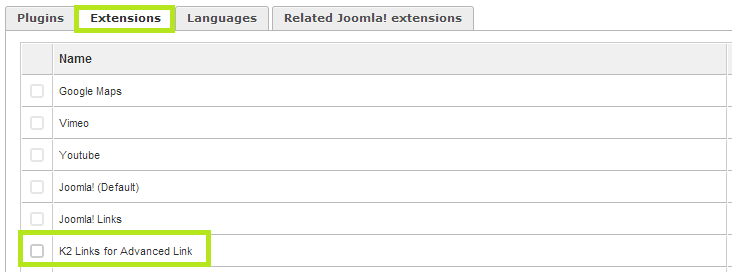
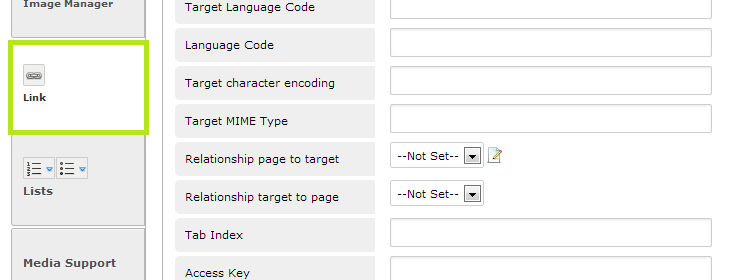
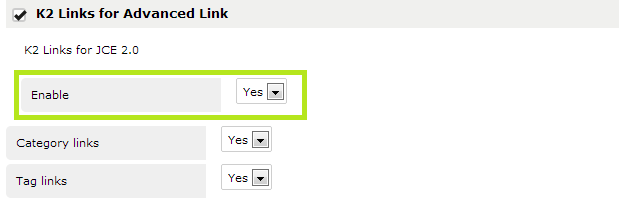
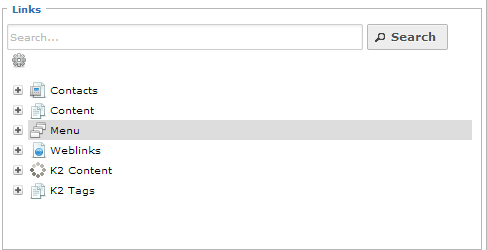
Esta no debe instalarse mediante el instalador de extensiones de Joomla! Debe hacerse mediante el instalador que viene incorporado en el editor. Verificamos que se encuentre instalado Una vez instalada puede ser configurada desde Componentes>JCE Editor>Perfiles (Profiles). En la pestaña de parámetros de los plugins nos dirigimos a Links Buscamos la configuración del plugin y verificamos que esté activado y decidimos si queremos activar la opción de hacer links por Tag y por Categoría Una vez hecho esto comprobamos que funcione utilizandolo directamente en el editor
  • Roberto Céparo
  • Roberto Céparo's Avatar
21 Apr 2013 04:50
Replied by Roberto Céparo on topic [SOLVED] Tag menu in 3 or 4 column

[SOLVED] Tag menu in 3 or 4 column

Category: English K2 Community

Krikor Boghossian wrote: Hello Roberto,

By default K2 displays tags in a single columned layout.
You have to remove the clearing div at the bottom of the item and set a width and a float for it's container.


thank you very much for your help!. 'll try, thanks
  • Peter
  • Peter's Avatar
20 Apr 2013 10:42 - 21 Apr 2013 10:16

How to display all extra fields in table format

Category: English K2 Community

I am building a school guide. I have already populated my K2 with many items which have 9 extra fields. The K2 items don't carry any content. The extra fields are the real content. Right now all items including extra fields are displayed each on separate lines. I have already discovered in the template that "<ul>" and "<li>" HTML tags are used in the standard K2 installation.

I want to display all extra fields in a visual table format like (without using the table HTML tag):
[tr]
[td]Extra Field Name 1[/td]
[td]Extra Field Name 2[/td]
[td]Extra Field Name 3[/td]
[/tr]

[tr]
[td]Item1 - Data Extra Field 1[/td]
[td]Item1 - Data Extra Field 2[/td]
[td]Item1 - Data Extra Field 3[/td]
[/tr]
[tr]
[td]Item2 - Data Extra Field 1[/td]
[td]Item2 - Data Extra Field 2[/td]
[td]Item2 - Data Extra Field 3[/td]
[/tr]
[tr]
[td]Item3 - Data Extra Field 1[/td]
[td]Item3 - Data Extra Field 2[/td]
[td]Item3 - Data Extra Field 3[/td]
[/tr]
[tr]
[td]Item4 - Data Extra Field 1[/td]
[td]Item4 - Data Extra Field 2[/td]
[td]Item4 - Data Extra Field 3[/td]
[/tr]
[tr]
[td]Item5 - Data Extra Field 1[/td]
[td]Item5 - Data Extra Field 2[/td]
[td]Item5 - Data Extra Field 3[/td]
[/tr]
[tr]
[td]Item6 - Data Extra Field 1[/td]
[td]Item6 - Data Extra Field 2[/td]
[td]Item6 - Data Extra Field 3[/td]
[/tr]


Does K2 core offer this functionality, and if yes, how do I use it?
  • Steven Johnson
  • Steven Johnson's Avatar
19 Apr 2013 15:27 - 19 Apr 2013 15:27
Replied by Steven Johnson on topic How to display specific extra field in a Tag Page

How to display specific extra field in a Tag Page

Category: English K2 Community

For those who are interested in using the newer method to display an extrafield on the tag page, a hack to one of the core files (as of K2 2.6.6) Here is what I did:


Add some extra code to components\com_k2\models\item.php

Add || $task == "tag" to extrafields condition (line ~181):

//Extra fields
if (($view == 'item' && $item->params->get('itemExtraFields')) || ($view == 'itemlist' && ($task == '' || $task == 'category') && $item->params->get('catItemExtraFields')) || ($view == 'itemlist' && $task == 'tag' && $item->params->get('tagItemExtraFields')) || ($view == 'itemlist' && ($task == 'search' || $task == 'date') && $item->params->get('genericItemExtraFields')) || $task == "tag")

Use the following syntax to display the extra field
<?php echo $item->extraFields->fieldAlias->name; ?>
<?php echo $item->extraFields->fieldAlias->value; ?>
  • andy
  • andy's Avatar
19 Apr 2013 13:42

Where "Display by tag..." Tag pages are save in DB

Category: English K2 Community

I did review before this post and at first look I thought the problems were sort out but as said after some weeks the duplicates start to appear. I made the hidden menu and activate some new future in the Seo and tag options screen, I couldnt enable them all because of the warning:

"Enabling this option will modify all K2 URLs making them more SEO friendly. However this option will add a significant performance hit for websites with more than a few hundred K2 items in them. Use with caution. This option is disabled by default. "

My website has thousands of pages and this new k2 settings were made recently and as I understood the changes only apply to new items.

Anyhow the problem is not that one item has different menu items and the duplicate can appear there, no, every item or category has unique menu path, the duplicates are only with the Tag terms , this tag terms are not assigned at all to that Item...
  • Jürgen Kauer
  • Jürgen Kauer's Avatar
19 Apr 2013 12:29
Replied by Jürgen Kauer on topic GELÖST: Pfadlinks von K2-Parameter entschlacken

GELÖST: Pfadlinks von K2-Parameter entschlacken

Category: Offizielle deutsche Gemeinschaft

Danke für die Info!
Jetzt - eine Tag später - sind die "k2-bezeichnungen" weg. Vermutlich nach dem Löschen des Cache.
Für alle Interessierten hier meine "Erweiterten SEF-Einstellungen" unter "K2-Einstellungen":


aktiviere die erweiterten SEF Einstellungen für K2 URLs = JA
K2_SEF_URL_PREFIX_FOR_CATEGORIES = content
K2_SEF_URL_PREFIX_FOR_TAGS = tag
K2_SEF_URL_PREFIX_FOR_USERSAUTHORS = author
K2_SEF_URL_PREFIX_FOR_SEARCH_RESULTS =search
K2_SEF_URL_PREFIX_FOR_DATE_LISTINGS = date
K2_SEF_URL_CATEGORY_PREFIX_FOR_ITEMS = nichts
K2_SEF_ITEM_URL_CUSTOM = leer gelassen
K2_SEF_USE_ITEM_ID_IN_URL = Ja
K2_SEF_ITEM_ID_TITLE_ALIAS_SEPARATOR = K2_USE_A_DASH
K2_SEF_USE_ITEM_TITLE_ALIAS = Ja
K2_SEF_USE_CAT_ID_IN_URL = Nein
K2_SEF_CAT_ID_TITLE_ALIAS_SEPARATOR = K2_USE_A_DASH
K2_SEF_USE_CAT_TITLE_ALIAS = Ja
  • Krikor Boghossian
  • Krikor Boghossian's Avatar
19 Apr 2013 12:19
Replied by Krikor Boghossian on topic Where "Display by tag..." Tag pages are save in DB

Where "Display by tag..." Tag pages are save in DB

Category: English K2 Community

If you have properly set up your menus you might want to have a look at this getk2.org/blog/1169-k2-v265-released getk2.org/blog/1169-k2-v265-released .
  • andy
  • andy's Avatar
19 Apr 2013 11:59

Where "Display by tag..." Tag pages are save in DB

Category: English K2 Community

hey, is been some time now since I originally post this but thanks anyhow; practically than there is no way to control or to save this work other other than a third extension maybe can help....

Another issue derivate from here and causing major duplicate issues in my case is how can one control the Tag terms to stay or hold only on the assigned Item ? For example me after some weeks thinking that I solved the Tag duplicate issue editing each page independently with unique metas sudenly I have hundresds of new Tag duplicate pages because the Tag is just migrating and autogenerating new url paths using Items or k2 menu items that doesnt have anything to do with that particular Tag.
For example:

/original_1st_alias/itemlist/tag/sara Tag1.html
/2nd_alias /itemlist/tag/sara Tag1.html
/3th_alias /itemlist/tag/sara Tag1.html

How could we stop to auto generate this url paths? Other than just not indexing the Tag pages?
txs,
Displaying 3581 - 3600 out of 6582 results.

Powered by Kunena Forum