Keyword

Advanced Search

Search Results (Searched for: k2 Tag)

  • Tom
  • Tom's Avatar
03 Nov 2020 16:18

K2 Tag System not working after Update

Category: English K2 Community

Hello Guys,

i updated my K2 to v2.10.3 and since then my Tag-System is not working.
The Tags still exist under the Tag-Tab but i cant Add any to a new Article.
Also i normaly used selection-tagging and now it is free-tagging and i cant change it to selection back.
Is someone here, who maybe had the same problem or some quickfixes?
I run a lokal newspaper and the tags are very important to me!
in Addition :
my IT-Provider modified some K2 files for Example
- templates/mytemplates/html/com_k2/default.php
- admin/templates/isis/html/com_k2/item/default.php

but i already checked them for Code about the tagging and copied the old one in it, still no change...

Many thanks already, if someone can help
  • JoomlaWorks
  • JoomlaWorks's Avatar
30 Oct 2020 17:43
Replied by JoomlaWorks on topic K2 Category view from url

K2 Category view from url

Category: English K2 Community

Technically speaking, it's not hard to do any of the things you ask.

However, because most of what you ask is probably "pro level" stuff, these requests can't be generally identified and implemented in K2.

If you need to load a different category template you can check for the category ID at the top of your category.php override and then split your code to 2 or more sub-templates. Combine this check with menu item IDs and you'll be able to call the same category with a different layout based on where the visitor currently is.

You can follow a similar practice to load a CSS file based on category ID, parent category, category name etc.

In general you have your views (item, itemlist, latest), layouts for the itemlist view (category, tag, user etc.) & formats (html, feed/xml, json, jsonp, raw).

If you need a very specific example, please ask.
  • JoomlaWorks
  • JoomlaWorks's Avatar
29 Oct 2020 20:24
Replied by JoomlaWorks on topic Duplicate tags when importing Joomla content

Duplicate tags when importing Joomla content

Category: English K2 Community

Great, I'll merge the change for K2 v2.10.4.
  • Marc
  • Marc's Avatar
27 Oct 2020 22:32

Installation impossible sous Joomla 3.922

Category: Communauté française K2

didn't help

JInstaller: :Install: erreur SQL Index column size too large. The maximum column size is 767 bytes.
Extension Installer : Erreur SQL de traitement de la requête : Fonction DB échouée avec le numéro d'erreur 1709
Index column size too large. The maximum column size is 767 bytes.
SQL =
CREATE TABLE IF NOT EXISTS `#__k2_tags` (
`id` int(11) NOT NULL AUTO_INCREMENT,
`name` varchar(255) NOT NULL,
`published` smallint(6) NOT NULL DEFAULT '0',
PRIMARY KEY (`id`),
KEY `idx_name` (`name`),
KEY `idx_published` (`published`)
) ENGINE=InnoDB DEFAULT CHARSET=utf8mb4 DEFAULT COLLATE=utf8mb4_unicode_ci;
  • JoomlaWorks
  • JoomlaWorks's Avatar
27 Oct 2020 20:50 - 27 Oct 2020 20:52
Replied by JoomlaWorks on topic Duplicate tags when importing Joomla content

Duplicate tags when importing Joomla content

Category: English K2 Community

The K2 importer merges both tags and meta keywords and converts them to K2 tags.

However I see we have a bug in the code that decides how these are filtered and converted to tags.

Please test the following if you can. Edit the file /administrator/components/com_k2/models/items.php and replace these lines github.com/getk2/k2/blob/master/administrator/components/com_k2/models/items.php#L1413-L1431 with this:
// Check if the tag exists already $query = "SELECT id FROM #__k2_tags WHERE name=".$db->Quote($itemTag); $db->setQuery($query); $id = $db->loadResult(); if ($id) { $query = "INSERT INTO #__k2_tags_xref (`id`, `tagID`, `itemID`) VALUES (NULL, {$id}, {$K2Item->id})"; } else { $K2Tag = JTable::getInstance('K2Tag', 'Table'); $K2Tag->name = $itemTag; $K2Tag->published = 1; $K2Tag->store(); $tags[] = $K2Tag; $query = "INSERT INTO #__k2_tags_xref (`id`, `tagID`, `itemID`) VALUES (NULL, {$K2Tag->id}, {$K2Item->id})"; } $db->setQuery($query); $db->query();

This should filter the tags correctly before importing them.

Let me know.
  • JoomlaWorks
  • JoomlaWorks's Avatar
27 Oct 2020 20:31
Replied by JoomlaWorks on topic save k2 categories field in plugin configuration

save k2 categories field in plugin configuration

Category: English K2 Community

Use this:
<field name="yourVariableNameHere" type="k2modalselector" scope="categories" default="" label="Category selector" description=""/>

This is a flexible field which can easily be adapted to select items, tags & categories by changing "scope" to items, item, tags, tag & category or categories as in your case. When using item, tag or category the selection is single.
  • Hedgy
  • Hedgy's Avatar
25 Oct 2020 17:44

Duplicate tags when importing Joomla content

Category: English K2 Community

I have an issue when importing joomla content to K2.
It seems for every tag it finds it creates a new tag, even if the tag already existed.
Because of this I'm getting a lot of duplicate tags. And going to the tag-url will only show one item.

Is there a way to solve this? I tried looking for a way to merge the tags but can't find one.

I tried reinstalling K2 to reimport the articles, but I get the same issue

K2 version: v2.10.3
Joomla version: 3.9.22
  • JoomlaWorks
  • JoomlaWorks's Avatar
20 Oct 2020 20:38
Replied by JoomlaWorks on topic Menu tag K2 sur 2 colonnes

Menu tag K2 sur 2 colonnes

Category: Communauté française K2

That file is a blog-style listing (by default). So in general, it's not hard adapting its layout.
  • tip
  • tip's Avatar
19 Oct 2020 11:59
Replied by tip on topic Menu tag K2 sur 2 colonnes

Menu tag K2 sur 2 colonnes

Category: Communauté française K2

thank's to a friend, I understood and update tag.php

and thanks to Krikor Boghossian when he said
remove the clearing div at the bottom of the item and set a width and a float for it's container

if it can help other people, here is my modified file

File Attachment:

File Name: tag.zip
File Size:2 KB
  • Hesam
  • Hesam's Avatar
19 Oct 2020 02:47 - 20 Oct 2020 09:30

Version 2.10.3 problem with multilingual website

Category: English K2 Community

I found a problem in the "System - K2" plugin in version 2.10.3. When the "System - K2" plugin is enabled, if the site is multilingual, the language attributes ("lang" and "dir") that appear on the HTML tags, don't change and only the default language attributes will be displayed.

I checked the version 2.10.2 and everything is ok.

Please note that it does not matter if you use the K2 component or not; just install K2 to see this issue.

Please help and let me know what can I do?
  • tip
  • tip's Avatar
18 Oct 2020 13:04 - 18 Oct 2020 15:24
Menu tag K2 sur 2 colonnes was created by tip

Menu tag K2 sur 2 colonnes

Category: Communauté française K2

Bonjour / hello,

Depuis le menu tag K2, j'aimerai que les articles affichés soit sur 2 colonnes.
From the menu tag K2, I would like the items displayed to be on 2 columns.

J'ai trouvé les articles suivants, mais ce n'est pas assez compréhensible.
I found the following articles, but it's not understandable enough.
Pourriez vous me dire exactement quel fichier je dois modifier et quelle modification je dois faire ?
Could you tell me exactly what file I need to modify and what modification I need to make?
this one : root/components/com_k2/templates/default/tag.php ? and after ?

Merci d'avance pour votre aide !
Thank you in advance for your help!
  • Electronic Beatz Network
  • Electronic Beatz Network's Avatar
16 Oct 2020 00:58 - 16 Oct 2020 01:08
Replied by Electronic Beatz Network on topic Stop K2 image resizing

Stop K2 image resizing

Category: English K2 Community

It helpeld me four years later! I had a problem with the images in a Tag-Listing... thanks to yout - problem solved.

egculture.de/labels/electronic-groove-culture/artists
<? if(count($this->items)) { ?> <div class="row"> <? foreach($this->items as $item) { ?><div class="col-xs-4 col-sm-3 col-md-2 col-lg-2"> <a href="<?=$item->link; ?>" class="thumbnail"><img class="img-thumbnail" src="<?=JURI::base(true).'/media/k2/items/src/'.md5("Image".$item->id).'.jpg'; ?>" alt="<? if(!empty($item->image_caption)) echo K2HelperUtilities::cleanHtml($item->image_caption); else echo K2HelperUtilities::cleanHtml($item->title); ?>" style="margin:5px;"/></a> </div><? }?> </div> <? }?>

Background: I change the generic-imagesize in the backend a few times the last years. But the existing images weren't resized... so I had a tag-listing-view with x different image-sizes...
  • Jonathan Magoga
  • Jonathan Magoga's Avatar
10 Oct 2020 05:16 - 10 Oct 2020 05:18

AllVideos for K2 not using the poster at the same folder for local videos

Category: AllVideos

Thank you Fotis.
I trust your judgement on this one and will wait for your solution instead of meddling with the core code.
If you think it would help your users, you may want to add the solution below to your documentation as an alternative for having a custom poster.

For everyone watching this conversation in search of an immediate solution for adding a custom poster to JW allVideos, I have found a workaround, using allVideos markup, and the "embed" tab of the media tab. Here is the code I used there, lifted from the rendered video from allVideos on K2:

<div class="avPlayerWrapper avVideo">
<div class="avPlayerContainer">
<div id="AVPlayerID_1" class="avPlayerBlock">
<video class="avPlayer" style="width: 100%;" src="/images/videos/YOUR_VIDEO_HERE.mp4" poster="/images/videos/YOUR_VIDEO_HERE.jpg" preload="metadata" controls="" controlslist="nodownload"></video>
</div>
</div>
</div>

You can easily find the other possible options by enabling everything on the All Videos plugin, uploading a video at the "upload" tab, and inspecting the rendered page for the video tag.
You can also find more info about the video tag here: www.w3docs.com/learn-html/html-video-tag.html

Cheers.
  • JoomlaWorks
  • JoomlaWorks's Avatar
09 Oct 2020 18:31

AllVideos for K2 not using the poster at the same folder for local videos

Category: AllVideos

>> If we use {mp4}, which is the local version, then /media/k2 gets added to the url. However, the docs state that {mp4} should come from /images/videos.

K2 modifies the base path for media to be rendered via AllVideos.

>> If we use {mp4remote}, K2 puts a relative URL inside the tag, which works as well for local URLs.

That's how we render anything that is not uploaded. It's a convention. Not the best, but it's worked fine for over a decade.

As for 1 & 2, these suggestions are not easy and require database schema changes for K2.

Like I said, I prefer to resolve this in AllVideos.
  • Tempe
  • Tempe's Avatar
08 Oct 2020 14:55 - 08 Oct 2020 15:21
K2 installation issue was created by Tempe

K2 installation issue

Category: English K2 Community

Hi there,
I'm new to K2, it was installed with the template I purchased, however, there appears to be some problems with usability, I can not seem to add or remove existing tags, some of the tabs are not able to be selected, a sub menu is appearing over the edit area too. I have tried uninstalling and reinstalling K2, also installed a new version of joomla with previous versions of K2 2.10 with no effect. Am I doing something wrong?
K2 2.10.3 tried 2.10.2 and 2.10.0 with the same problem
Joomla 3.9.18
PHP 7.3.12
  • Jonathan Magoga
  • Jonathan Magoga's Avatar
08 Oct 2020 04:36

AllVideos for K2 not using the poster at the same folder for local videos

Category: AllVideos

According to my tests, the tag effects are contrary to what's described in the docs for the plugin.

If we use {mp4}, which is the local version, then /media/k2 gets added to the url. However, the docs state that {mp4} should come from /images/videos.

If we use {mp4remote}, K2 puts a relative URL inside the tag, which works as well for local URLs.

What you could do, which I hope could be a simple task, is:

1. From the "upload" tab:
Add a second file field to upload a poster.
Add a checkbox below the "delete video" checkbox to "delete poster", so the user can revert back to the 5th second.

2. From the "browse server" tab:
Add a checkbox to "use custom poster".
If checked, AllVideos should look inside the same folder for a jpg|jpeg|png of the exact same name and use it as a poster.
Unchecking it would revert back to the 5th second.

I'm taking a look at JW Github, and will attempt to effect the change.
If I am successful, I'll get back to you.

Cheers.
  • JoomlaWorks
  • JoomlaWorks's Avatar
07 Oct 2020 10:51
Replied by JoomlaWorks on topic K2 tags search redirect 404 errors

K2 tags search redirect 404 errors

Category: English K2 Community
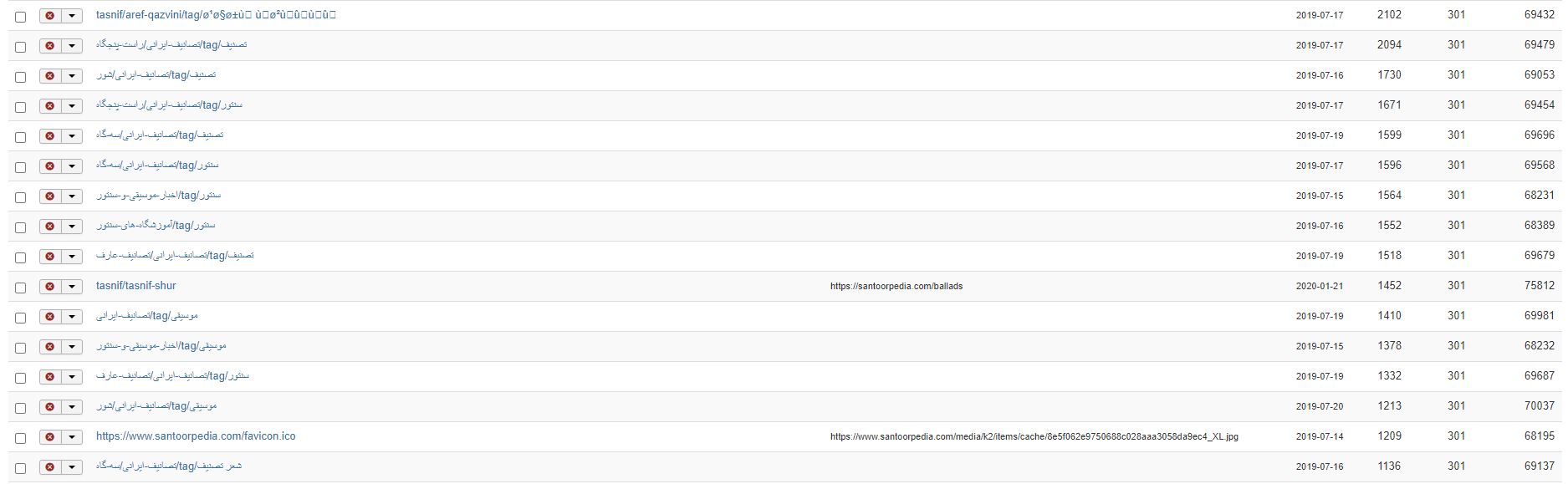
Even so, there is no reason for 404s. Even when duplicate tag URLs occur (due to how Joomla's URL routing works), they just work.

If you get 404s, the problem is most likely elsewhere.

So you need to provide more info on your Joomla site's setup (e.g. do you use an additional SEF extensions?) and an actual URL if possible with a couple of working and non-working tag URLs.
  • JoomlaWorks
  • JoomlaWorks's Avatar
07 Oct 2020 10:32

AllVideos for K2 not using the poster at the same folder for local videos

Category: AllVideos

When you upload media in K2 (which are then moved into /media/k2/videos/ etc.), we use the "local" option in AllVideos for playback. That's why modifying the DB record doesn't work as we check the AllVideos tags before playback.

I believe it's simpler to resolve this on AllVideos. E.g. if the site domain + AllVideos video/audio folder is included at the start of a (Xremote}...{/Xremote} tag set, then convert to local {X}...{/X}.

I'll note this down for the next update of AllVideos.
  • Sori
  • Sori's Avatar
06 Oct 2020 16:49
Replied by Sori on topic K2 tags search redirect 404 errors

K2 tags search redirect 404 errors

Category: English K2 Community


Here is a screenshot of the tag redirect errors.
  • Sori
  • Sori's Avatar
06 Oct 2020 16:42
Replied by Sori on topic K2 tags search redirect 404 errors

K2 tags search redirect 404 errors

Category: English K2 Community

Hello Fotis,

Yes, the screenshot doesn't open as I uploaded it. it's size is reduced and quality is poor. I will find a way to reattach and show you the list.
The tags are not deleted. The tags still exists in many items. once you click on the tag on the item it will list all the items with that list.
However, some how the tags are being scrawled by search engines and lead to impertinent pages and lots and lots of 404 errors. For example on one tag which still exist on the website I have 2090 404 errors!!!
This will impact your website adversely on the search engine. This amount of 404 errors from k2 tag system on one of my websites is over a million. it's insane.
For a long time I had been trying to find a solution and I haven't been successful.
Displaying 221 - 240 out of 6582 results.

Powered by Kunena Forum