COMMUNITY FORUM
Search Results (Searched for: k2 Tag)
- Nikos Papanikolaou

Seach module
Category: Commercial Joomla Templates
- Daniel

22 Jul 2013 10:23 Bild wird nur im Einleitungstext nicht angezeigt was created by Daniel Bild wird nur im Einleitungstext nicht angezeigt
Category: Offizielle deutsche Gemeinschaft
Hi liebe K2 Community,
Ich habe das im "englischen Bereich" zwar auch eben geschrieben, aber vielleicht sind die deutschsprachigen aktiver / bzw. kann ich mich besser ausdrücken :D
Also, von einer früheren Installation beinhalten die Artikel anfangs Bilder, die direkt mit <img> tag eingebunden sind. Sie werden in der Artikelansicht auch toll angezeigt. Also das nicht-existieren der Bilder kann man ausschließen.
Sieht eher nach so einer aufräumaktion aus, die keine html tags duldet.
Bei den Einstellungen unter Inhalt aufräumen ist dieses jedoch (hoffe ich doch) deaktiviert, aber auch wenn ich es ein- und ausschalte, als Ausnahme <img> tags hinzufüge, ... - wird das Bild immer noch nicht angezeigt.
Ich hoffe jemand weiß da eine Lösung, da ich nicht alle Bilder manuell als Bild in K2 einstellen will, um es beim Einleitungstext anzuzeigen.
Danke schon mal für eure Hilfe und Zeit.
lg Daniel - Daniel
<img> Image in Intro Text not shown
Category: English K2 Community
i have a problem with images in the intro text area - it is from an old installation so some images are directly inside the text with <img> - tag
I already checked if content cleanup is not activated and it isn't - i already tried to enable it and take the img tag out. but the image (which is shown in full article view) is not shown in intro text.
i hope you can help me to find a solution quick.
thank you
daniel
- Maria Allegra Melani

k2 Tag
Category: Comunità italiana K2
- Tommy Pettersen

New to K2
Category: Commercial Joomla Templates
I am struggling a bit to understand the ins and out of the K2 component. If you could take a look at this page www.metatag.no/index.php/responsiv-design/portfolio-test/item/94-dekk-og-felg I have an Image gallery at the bottom of the page that I am trying to remove.
{gallery}www.flickr.com/photos/bfishadow/sets/72157615891499410/with/3547798618/{/gallery}
I have spent several hours looking for it, but can't figure it out. Can someone push me in the right direction, please?
Regards
Tommy
- Maria Allegra Melani
k2 Tag
Category: Comunità italiana K2
sto creando un sito con Joomla 2.5 e l'ultima versione di K2 . Il mio problema è che vorrei dare ad un articolo una categoria e dei tag. Usando il Modulo News Show Pro GK4 lo imposto sulla categoria che mi interessa e mostra gli articoli appartenenti ad essa, mentre usando lo stesso modulo e impostandolo per i tag mi dice che non esistono articoli per quel tag, invece sono stati inseriti.
Ho provato con altri moduli che hanno lo stesso scopo come K2 Related Content ma danno tutti il solito errore di assenza di articoli.
Sembra che i moduli e i tag k2 non comunichino tra loro.
Mi sapete aiutare?
Grazie
- Krikor Boghossian

Problem with displaying items by tags
Category: English K2 Community
You should upgrade to Joomla! 3.1.1 and K2 2.6.7.
Also make sure your template overrides (and tag.php to be precise) have the proper code for pagination
- Вячеслав Емельянов

Problem with displaying items by tags
Category: English K2 Community
PS Sorry for my bad english
- Krikor Boghossian
youtube not working after install JCE 2.3.3.2
Category: English K2 Community
This is an issue related to the JCE editor not K2. Some settings of the editor possibly changed during the upgrade. Look for which html tags are allowed and which are stripped.
If you are still experiencing issues with you editor you should contact the JCE developer.
- Deigo Bocni

item image: particular need
Category: English K2 Community
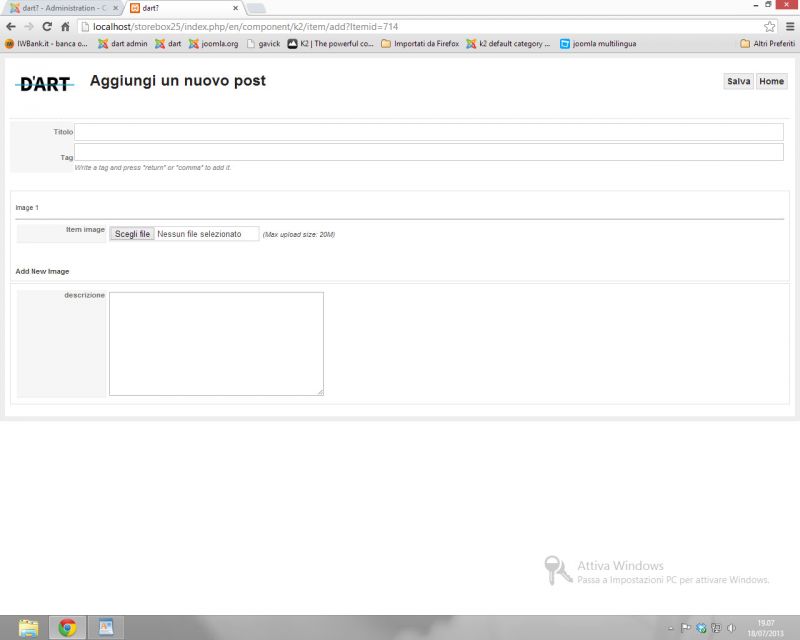
Attachment not found
i need to costum k2 multi image plugin
i attach 3 screenshots:
01.jpg is the way the itemform look after i edited the .php file (...\plugins\system\k2multiimages\K2MultiImages\administrator\templates\itemform_multiimages.php) with html and php comment tag.
02.jpg is the way i want the itemform automatically look like when user visit it: no need to press "add new image" 3 times for having the possibility of uploading 4 images: images are 4 and stay 4!
03.jpg is the way i want previews of images look like: images must combine with other images, background or png file with tranparency, images1 has his specific background, image 2 has his etc... example: user upload a photo, the preview show how the photo look printed on a tshirt (because i use blank tshirt as background!). i think it can be done with something like this:
<div style="position:relative">
<img src="backgroun.jpg" style="position:absolute;"/>
<img src="preview.png" style="position:absolute;"/>
</div>
images and background has specific precise pivel dimension (this make it easier i think).
Can it be done with some code work on that php file?
Thanks for answering
- Krikor Boghossian
Display ALL K2 Items in one column
Category: English K2 Community
You have to use the W3C's HTML Valitator to see which elements are not closing properly.
- Nicole

[SOLVED] how to create striped style tag lists
Category: English K2 Community
I'm having a ton of trouble figuring out how to apply this same styling to my tag lists. Essentially I have a menu created from tags. When my tag items display in a list I need every other one to have a background color. I've tried applying <?php echo ($key%2) ? "odd" : "even"; ?> to the tag.php file after <div class="tagItemView"> with no luck. It seems to only pick up the "even" value in the list.
I need to apply the styling to this page - ryangroupstl.com/scottprop/index.php?option=com_k2&view=itemlist&layout=tag&tag=less%20than%202,000%20sq%20ft&task=tag&Itemid=253
Any suggestions would greatly be appreciated!
- schlogo

k2 user extended info for joomla 3.0
Category: English K2 Community
userExtendedFields.xml : Change install tags for extension tags
userExtendedFields.php : Near line 43, replace JParameters by JRegistry
Plugin now install correctly on Joomla 3.0, i have my extrafields (that were already in the database) to display in frontend. I also have access to the admin part of the plugin
Now looking to get the plugin to work in users managerment screen
- Krikor Boghossian
[SOLVED] K2 Item Images are not Visible to SE's
Category: English K2 Community
This is not related to K2. Joomla! by default blocks access to the media and images folders in it's robots.txt.
Open your robots.txt file and comment out (using a hashtag # in front) the images and media folders.
- Reziun

Joomla! Tags (3.1) for K2
Category: English K2 Community
I love K2 in every way over Joomla! except for the new Tag system. With the website I am building I need a way to tag items in an organized manner, and the new Joomla! 3.1 tag system which allows parent and child tags works great for this.
I'm wondering if there is a way I could get K2 to display Joomla! 3.1 tags instead of K2 tags, or a mod that allows K2 to have parent/child tags much like Joomla. Or any other solutions I haven't thought of yet.
Thank you!
-Reziun
- nikolasr200

[SOLVED] Need to make cusom filter
Category: English K2 Community
Yiota Ziaggou wrote: Hello Nikos,
Why don't you create a menu with each menu item typed as K2 Tags, select the tag for each one and show that in your page?
Once click on the menu item, the tag list page will show and you won't have to do any more customization.
Thankyou for the hint Yiota, very good point
- Yiota

[SOLVED] Need to make cusom filter
Category: English K2 Community
Why don't you create a menu with each menu item typed as K2 Tags, select the tag for each one and show that in your page?
Once click on the menu item, the tag list page will show and you won't have to do any more customization.
- nikolasr200
[SOLVED] Need to make cusom filter
Category: English K2 Community
I dont know where to start from, how to implement this to retrieve k2 items and display them in item listview... If i could have some help to accomplish it i would really appreciate it..
- BBC

Just heard of K2 and need clarification
Category: English K2 Community
Rest is OK, K2 doesnt impact other classes on website.
Second question is not about K2 or Joomla, depends what HTML editor you install and use. See on JED what are most and best reviewed.
- Krikor Boghossian
itemlist/tag appearance??
Category: English K2 Community
This template uses the default K2 styling and I haven't noticed any issues regarding compatibility.
The tag layout uses a different file (tag.php) and different CSS classes for its layout.
You need a basic/medium understanding of coding to achieve what you want.
You have to either change the classes in the tag.php file to match the ones with your category_item.php or locate the tag styling in your template's k2.css and style them the way you want.