COMMUNITY FORUM
Search Results (Searched for: k2 Tag)
- Brian

Notice: Undefined variable:
Category: English K2 Community
Notice: Undefined variable: categoryImage in /home/www/dancefactorstudios.com/components/com_k2/helpers/utilities.php on line 95
I am using Joomla 2.5.3 and K2v 2.5.4
Any Ideas? I have tried turning of System debug in Global Config.
Thanks,
Brian.
- Aimery Marsily

K2_content module filtré par tag
Category: Communauté française K2
- Jerome

K2_content module filtré par tag
Category: Communauté française K2
Tu trouveras l'exemple de la page à ladresse suivante :
www.kelchemise.fr/les-marques-de-chemises-commencant-par-0-9.html
Meme si le temps de chargement est un peu long, l'effet visuel des titres est top... A voir si j'arrive a trouver une solution pour ordonner les tags ..
Si quelqu'un à une solution, dites le moi SVP
- Peter Grube

AllVideo Player in Modal Popup
Category: English K2 Community
It's quite simple to do I just put a div around the existing media code, and added a style display none tag on that div.
I then added an ID tag to <div class="itemVideoBlock" id="video_pop">
I then added the following Text Link Code where I wanted it to display
- william white

Problem with right & left sidebars & K2
Category: English K2 Community
s5_content_area w firebug
disable width 955px in that tag
your right sidebar will come back into place
- Kit

How to show item ratings in the K2 Content Module?
Category: English K2 Community
That got me EXACTLY where I needed to be.
Small fyis to anyone else who happens to come along after this with the same issue, if they need it:
1. the helper.php is at: modules -> mod_k2_content -> helper.php
2. the item.php template (or category_item.php) are in: components -> com_k2 -> templates -> default -> item.php template (or category_item.php)
3. don't copy the php code on top or bottom of the <!-- Item Rating --> section
4. If you leave the code as it is, people will still be able to vote. To JUST show the star rating and NOT have people vote, take out:
replace this:
- Massimo Marchetto

22 Apr 2012 18:14 Replied by Massimo Marchetto on topic K2 Multi Categorie K2 Multi Categorie
Category: Comunità italiana K2
Penso che tu debba fare ricorso ad plugin aggiuntivo. Vedo ad esempio che c'è questo
www.usjoomlapros.com/Extensions/K2-Multi-Categories/flypage.tpl.html
ma ad essere sincero non l'ho mai usato.
Non è escluso, da quanto si legge in questo stesso forum, che in futuro non diventi una funzione standard di K2.
Ovviamente è sempre possibile superare l'ostacolo dell'alberatura rigida delle categorie sfruttando i tag.
- Andrey Miasoedov

How to show item ratings in the K2 Content Module?
Category: English K2 Community
You need to do the following, for showing item rating in mod_k2_content:
1) In helper.php before $rows[] = $item; at line 569 add the following:
$item->votingPercentage = $model->getVotesPercentage($item->id);
$item->numOfvotes = $model->getVotesNum($item->id);
2) Copy rating block from item.php template (or category_item.php) to any place in default.php of mod_k2_content;
3) Change all "$this->item" to "$item" in rating block text.
- Michael Rosa

using custom (mobile) template for an item
Category: English K2 Community
I'm trying to make a mobile template so I can display my K2 items on the mobile version of the site. This works fine for the latest_item but how would I go about this with a single item.
I have an item where I link to directly from the menu, but I've been unable to find an option in the menu to tell Joomla to load it with the mobile K2 template.
This site i'm working on is j25.xiphias.net/
Using Firefox with User Agent switcher I'm making an Android version first. the frontpage looks fine with collapsable items. I'm using the latest_item here. In the footer menu I have a link to webdesign wich is the direct link to an K2 item which I would like to display using my mobile template.
I'm still working on the category_item template and the tag search template but my guess this would be pretty much the same as the latest_item template.
Any help pointing me in the right direction would be appriciated.
Thanks,
-XiP
- JdKock

[SOLVED] How remove rss feed in category list
Category: English K2 Community
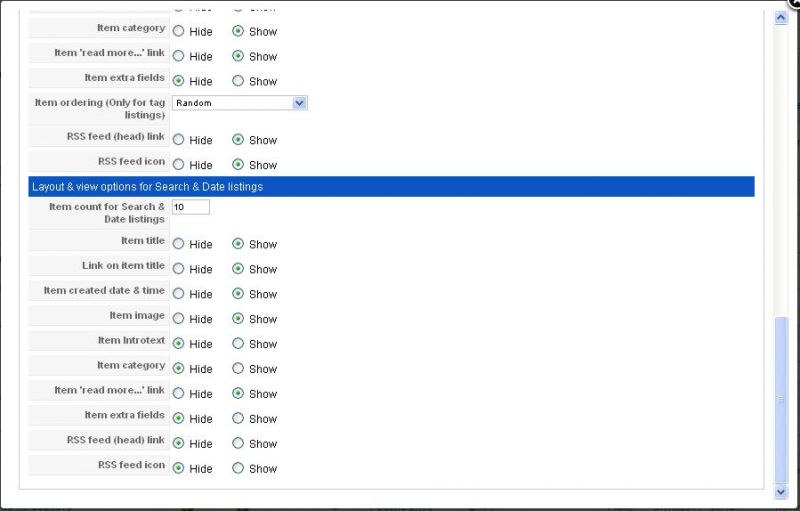
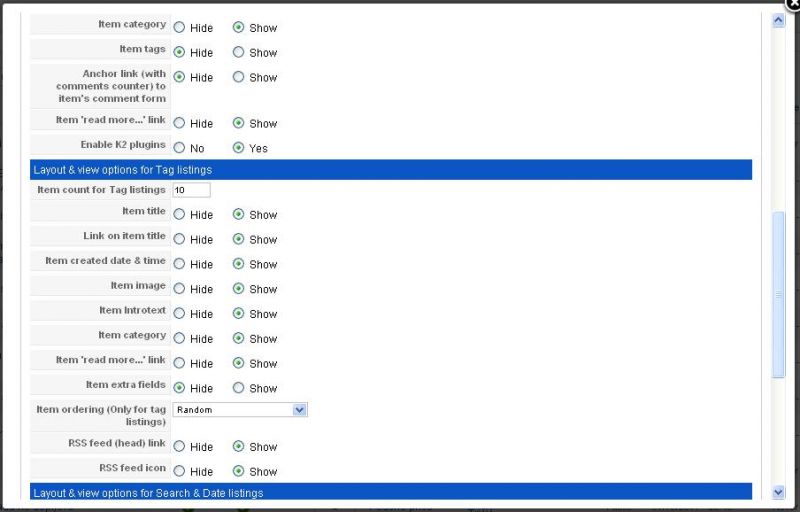
I see on line 25 that the if statement test on catFeedIcon. Where is this setting saved ? Because when i changed this to tagFeedIcon than my rss feedicon is not shown.
On my local pc the feedicon is not shown in the category list, but on my live site i have this problem. So where are the category settings saved ?
- Neil Boddie

Zip install
Category: Simple Image Gallery PRO
There was a problem rendering your image gallery. Please make sure that the folder you are using in the Simple Image Gallery Pro plugin tags exists and contains valid image files. The plugin could not locate the folder: media/k2/galleries/26.
The folder 26 exists ok with the image folder named fortrose inside 26.
The plug in root is set to images as advised.
I can set this {gallery}fortrose{/gallery} inside the item but this is defeating the whole object.
I paid for this extension to be able to click on Image Gallery then upload zip file click on save and my image gallery should be in place without the need to use the {gallery} and install the normal plug in way. Where have I gone wrong
- DINALVA ROMANCINI

K2 SEO issue - Can it be fixed?
Category: English K2 Community
OK... I'll quote the answer:Harald wrote: A user was referring to this threat and the answer of K2 was very quick!
Read more at
extensions.joomla.org/extensions/authoring-a-content/content-construction/8061#rev-118224
First things first...
K2 is a FREE extension. Let me repeat that. It's FREE.
That being said, it's got one of the largest extension communities within the Joomlasphere. As with any community, if our post doesn't get answered this may mean a couple of things. In big communities like K2's it may mean "please dig around a bit, the answer is already there".
As for SEO, K2 is far better that the default Joomla! article system which is the base of reference in terms of content. K2 makes smart use of both HTML tags and attributes to interlink and present content as SEO as Joomla! allows any extension to be. The only culprit, which I've mentioned earlier to another poster is double URLs for content. But this happens due to the nature of Joomla! and how it structures extesion content based on menu items. In other words, if you have content categories that are NOT mapped into some menu item, then it's likely that you'll end up with double URLs for the same content. BUT... If you create a menu item that properly maps your category structure THE PROBLEM IS SOLVED. End of story. It's THAT simple.
If you're to complain about SEO, make sure you know how SEO is implemented too.
I have ALL my categories mapped in the right menu item. So that in not the point.
Answer this, why the oficial site of K2 have this problem too?
BTW, Are you saying that the solution is create a menu item for each article? Is this serious?
Please: some help from moderator! Regars! ;)
- Magritte

k2 and simple image gallery pro plugin integration
Category: Simple Image Gallery PRO
.magritte
- enano

extra fields in related items by tag
Category: English K2 Community
I want to show the extra fields of the items related by tag.
$ this-> relatedItems is the array with related items and each item related have a data such as title, category, author, etc..(you can see in com_k2/item.php around line 461) I want to add the extra fields in these item data...
I can not find where are the parameters relatedItems to add the extra fields. I search
componets/com_k2/model/item.php
componets/com_k2/controller/item.php
thank you very much.
- JdKock
[SOLVED] How remove rss feed in category list
Category: English K2 Community
In the administration of the category is already disabled rss feedlink and rss feedicon, but nothing happened. I also looked in the K2 parameters and disabled everything with rss.
In the tag list i already disabled this icon, but not in the category list.
- DINALVA ROMANCINI
K2 SEO issue - Can it be fixed?
Category: English K2 Community
The Menu of the sidebar is the Principal Menu. The Horizontal Menu it's only showing specific articles and tags items.
Anyway, the problem is not the menus, the problem is how K2 shows the items. BTW I am not the only one with this problem, ALL K2 SITES have this problem, including the official website.
K2 allows all visitors access to one article from anywhere in the site. That is, from the current menu path, to the path of the item. This creates very strange and unique URLs, as the fact that an item appear in a totally different menu. And Google Spider crawls that URLs too, as duplicates.
This problem combines so many URLs, that this can virtually DESTROY all meaning of SEO.
Please, Moderators help us to only understand this!
Resgards!
Al wrote: It might be the way you setup the menu. I don't understand your menu
example:
your pathway: Infoiguassu>>Atraçoes>>Represa Itaipu>>Lojas de Vinho>>Adega Caminos em Puerto Iguazu
www.infoiguassu.com/pt/atracoes
www.infoiguassu.com/pt/onde-comprar/vinhos <-- why isnt this atracoes/onde-comprar/vinhos if the pathway shows it?
In K2 if you don't make the menu system exactly how the k2 categories/sub-categories are setup URL can look different. The item won't show in the correct category it belongs too.
It is hard to tell for me since you have two different menus. Anyways, that is my guess.
- Albert

K2 SEO issue - Can it be fixed?
Category: English K2 Community
example:
your pathway: Infoiguassu>>Atraçoes>>Represa Itaipu>>Lojas de Vinho>>Adega Caminos em Puerto Iguazu
www.infoiguassu.com/pt/atracoes
www.infoiguassu.com/pt/onde-comprar/vinhos <-- why isnt this atracoes/onde-comprar/vinhos if the pathway shows it?
In K2 if you don't make the menu system exactly how the k2 categories/sub-categories are setup URL can look different. The item won't show in the correct category it belongs too.
It is hard to tell for me since you have two different menus. Anyways, that is my guess.
Giu Tae Kim wrote: mhhhh.... this is a HUGE problem
I have a very complete site of tourist information, and I fully use the tags system and every K2 tool that it offers. I use to Simple Image Gallery PRO and other 3thd party extensions. Here is my site in 4 languages: www.infoiguassu.com
But this URL issue is killing my search results:
For example, for this only item in portuguese: www.infoiguassu.com/pt/onde-comprar/vinhos/item/70-adega-caminos
K2 creates this others:
www.infoiguassu.com/pt/atracoes/item/70-vinoteca-caminos
www.infoiguassu.com/pt/atracoes/represa-itaipu/item/70-vinoteca-caminos
www.infoiguassu.com/pt/foz-do-iguacu/item/70-vinoteca-caminos
www.infoiguassu.com/pt/onde-comer/cafeteria/item/70-vinoteca-caminos
www.infoiguassu.com/pt/onde-comprar/vinhos/item/70-adega-caminos
www.infoiguassu.com/pt/onde-comprar/vinhos/item/70-vinoteca-caminos
www.infoiguassu.com/pt/onde-ficar/hotel/item/70-vinoteca-caminos
www.infoiguassu.com/pt/onde-ficar/pousada/item/70-vinoteca-caminos
It's like any visitor can acess that only article from every section of my site: only adding "/item/70-vinoteca-caminos" at the end of the URL
This is KILLING all my work
I wonder why are the JoomlaWorks team doesn't replying this topic. I supose they know that it's a HUGE problem of K2 and solving this mean a LOT of work, maybe changing the core behaviour
Hope the best cause I really like K2 design and functions, and this is a very active community. Regards!
- Diana H.

differentiating between attachm. & including them
Category: English K2 Community
i was asked to "develop" a code-repository.
i'm really new to k2 (and haven't been using joomla for too long...) but i think this great component could really do the job (if configured the right way ;) )
in this repository every "code-item" should have a decription, a preview-image (plot), two attachments (both downloadble): the raw code (.txt) and one with example data (.txt). (furthermore every item should be tagged/assigned to categories.)
the raw-code-file (.txt) should be displayed on the item-page: in a scrollable div (if possible with GESHI-code-highlighting enabled).
so my question:
do you know how to handle attachments differently?
so that only the raw-code-file is displayed on the site and not the other one, too?
i've looked for solutions on the internet, but didn't find anything appropriate...
so i've played around a bit with the templates/default/item.php. and managed to include BOTH attachments (probably in a messy way, dunno).
- JoomlaWorks

18 Apr 2012 16:05 Replied by JoomlaWorks on topic Image Upload - Usability. Image Ordering Image Upload - Usability. Image Ordering
Category: Simple Image Gallery PRO
Simple Image Gallery Pro (currently in final stages of development) brings such features and not only to K2.
Compatible for both Joomla! 1.5 and 2.5.
Expect updates very soon ;) - danionic

plugin not working in K2 Content module
Category: AllVideos
ive now resolved the issue by including the mp3's within the article using the {mp3}{/mp3} tag.
please note though that there is still an issue with playing mp3's in a k2 content module when you add the mp3 as a media item. Maybe something to put on a bug list? it would be great to see this working properly as then it makes it much easier for 'non tech' end users to add their own mp3s to items
cheers!