Keyword

Advanced Search

Search Results (Searched for: k2 Tag)

  • k2testit
  • k2testit's Avatar
09 Jan 2019 15:21
Replied by k2testit on topic Videos play in articles but not in Kunena

Videos play in articles but not in Kunena

Category: AllVideos

No, I cannot "simply switch the root folder to point to Kunena" in order to solve my problem that I cannot play any EXTERNAL MP3-files from full URLs by using the
{mp3remote} ...{/mp3remote}
-TAG.

Switching the root folder to point to Kunena - what I alread have done - only make sure that one can upload MP3-Files in kunena posts and play those locally stored files in kunena posts by help of the {mp3}-TAG.

So the question is why {mp3remote} does not work correctly in kunena?

Regards
k2testit
  • k2testit
  • k2testit's Avatar
09 Jan 2019 10:56 - 09 Jan 2019 11:31
Replied by k2testit on topic Videos play in articles but not in Kunena

Videos play in articles but not in Kunena

Category: AllVideos

Hi,

unfortunately you missed that the MP3REMOTE-TAG does not work on my site (Joomla 3.8.13 stable)!

I i. e. enter
{mp3remote}https://archive.org/download/testmp3testfile/mpthreetest.mp3{/mp3remote}

and get a broken link
https://archive.org/download/testmp3testfile/mpthreetest.mp3%7B/mp3remote

instead of an AllVideo-Player window (look screenshot attached please).

Do you have an idea WHY the remote tag does not work?

Thanks and regards
k2testit


P.S.:
Changing the order of Allvideo-Plugin (first/last) does not have any influence on the problem mentioned above!
  • k2testit
  • k2testit's Avatar
09 Jan 2019 00:06
Replied by k2testit on topic Videos play in articles but not in Kunena

Videos play in articles but not in Kunena

Category: AllVideos

Fotis wrote: Maybe I missed your request on (1). It's my understanding you want users to listen to some MP3 file when browsing Kunena. If you meant you want to allow users to upload MP3 audio and have it playback on their posts, this may not be possible depending on Kunena permissions. Kunena allows attachments for sure but I doubt it allows for uploading MP3s to be directly embedded using AllVideos. In any case, ask in the Kunena forum to be sure.


Hello Fotis,

thanks for your reply!

Indeed I meant that users should be able to upload MP3 audio and have it playback on their posts.
Meanwhile I managed to play a LOCAL hosted MP3 audio file with AV in Kunena posts.

I had to add the extension mp3 to the list of allowed ones and to change the known settings in the kunena system plugin (message & body). Since Kunena uploads the files to media/kunena/attachments I entered that path for the LOCAL AUDIO FOLDER in AV. Afterwards the MP3 uploaded was played with AV!

But what I did NOT manage:

To make
{mp3remote}https://mydomain.tld/media/kunena/attachments/audiofile.mp3{/mp3remote}
playing the same audio file hosted on my server.

I thought with the
{mp3remote}...{/mp3remote}
tag one can make AV playing a direct URL leading to a MP3 file.
But the remote-mp3-tag leading to the same audio file on my server which can be played "locally" with the mp3-tag does not work.

Do you have any idea why it doesn´t?

As for the 2nd request, browser's (and the players included with AllVideos) are smart enough to not load the entire file. It is loaded in chunks as playback progresses. Try it. You'll see that skipping is also possible without the video being loaded entirely.


Thanks for the explaination!

By the way: I think that following text under
www.joomlaworks.net/support/docs/allvideos
is not correct:

In plain English this means that if your video exists in images/stories/videos/summer/trip_to_paris.flv and your "Local Video Folder" parameter is set to images/stories, you would simply enter {flv}summer/trip_to_paris{/flv}.


Best regards
k2testit
  • k2testit
  • k2testit's Avatar
04 Jan 2019 10:41 - 04 Jan 2019 10:42
Replied by k2testit on topic Videos play in articles but not in Kunena

Videos play in articles but not in Kunena

Category: AllVideos

Hello!

A happy new year and thanks a lot for your reply!

ad 1)
Do you mean Joomla MODULES with "a module (Custom HTML) ..."?
"Normal" users cannot create Joomla modules in a Kunena post. What do you mean with "module"?
I thought there were special "{}" tags one can use for AllVideos!?

ad 2)

However you can just upload the files on your server (e.g. in .mp4 or .webm format) and AllVideos will stream them just fine.


That means that the video file has to be loaded completely before AllVideos begins to play it, correct?

Thanks and best regards
k2testit
  • JoomlaWorks
  • JoomlaWorks's Avatar
04 Jan 2019 01:48
Replied by JoomlaWorks on topic Google creating wrong sitelink to tags not working

Google creating wrong sitelink to tags not working

Category: English K2 Community
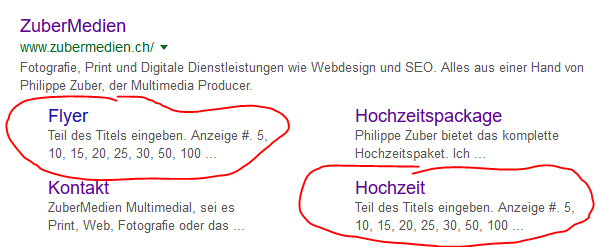
Your .htaccess file is fine.

This is what I see in Google: jmp.sh/LZr2vL8

The only problematic links are the ones pointing to the com_tags component which is part of Joomla and not K2. Perhaps these links are forgotten somewhere with menus pointing to such pages or elsewhere (e.g. in com_content articles).

K2 content seems to work just fine.
  • Philippe
  • Philippe's Avatar
19 Dec 2018 22:13

Google creating wrong sitelink to tags not working

Category: English K2 Community


No changes so far. Either I do something wrong, or k2 or the maker of this template.

So far I don't know what I am doing wrong.
  • JoomlaWorks
  • JoomlaWorks's Avatar
18 Dec 2018 17:50
Replied by JoomlaWorks on topic Wrong breadcrumb on tag-sites

Wrong breadcrumb on tag-sites

Category: English K2 Community

First, see how K2 MVC overrides are done: getk2.org/documentation/tutorials/174-templating-with-k2-and-the-concepts-of-sub-templates

The file you want to edit is "tag.php".
  • JoomlaWorks
  • JoomlaWorks's Avatar
17 Dec 2018 15:09
Replied by JoomlaWorks on topic Wrong breadcrumb on tag-sites

Wrong breadcrumb on tag-sites

Category: English K2 Community

There is no change that could affect breadcrumbs in that version. My guess is that it all boils down to your menu setup. Otherwise my suggestion to "Create a menu item in K2 pointing to all categories. Give it a generic name, e.g. "Content" and alias (content)." would show a different path in the breadcrumbs function of the K2 Tools module.
  • JoomlaWorks
  • JoomlaWorks's Avatar
14 Dec 2018 09:42
Replied by JoomlaWorks on topic Wrong breadcrumb on tag-sites

Wrong breadcrumb on tag-sites

Category: English K2 Community

It seems to show the site name there when it should be showing the tag name.

What K2 version are you using?
  • eran
  • eran's Avatar
13 Dec 2018 13:29
unresponsive k2 items view was created by eran

unresponsive k2 items view

Category: English K2 Community

I have a strange problem.

The k2 items view in administrator view is VERY SLOW.

This happens whenever I try to do ANYTHING with k2 items (view item, browse to any item, starting new item, saving, etc)

It does not happens with any other elements in the administrator and does not happens when dealing with other k2 elements other then k2 items (categories, tags, users etc - they are working fine and fast). I doesn't matter how many k2 items are in display in items view (even if there are only 5 items in items display, still it takes 1-2 minutes to view them or display timeout error message).

The front side of the site is working well & fast (also the k2 item display).

I'm using k2 ver 2.9 on joomla V 3.8.3

ANY IDEA what can i do ?
  • burnyourears
  • burnyourears's Avatar
12 Dec 2018 18:41 - 12 Dec 2018 18:43
Replied by burnyourears on topic Wrong breadcrumb on tag-sites

Wrong breadcrumb on tag-sites

Category: English K2 Community

Well, I actually tried that .. with an even worse result (the tag is not mentioned anymore) :-(
See in the screenshot both modules activated – the first one is the k2 tool, the second is joomla.

Hmmm.

  • JoomlaWorks
  • JoomlaWorks's Avatar
12 Dec 2018 17:53
Replied by JoomlaWorks on topic Wrong breadcrumb on tag-sites

Wrong breadcrumb on tag-sites

Category: English K2 Community

Why not try the K2 breadcrumbs feature in the K2 Tools module?

The path you see there is basically the path you followed to get to that page. That's one of the visual/structural bugs that K2 has solved ages ago over standard Joomla content (in Joomla, if you navigate e.g. from the frontpage to an article which has no direct menu item, the menu item ID remains the same - that of the frontpage).
  • JoomlaWorks
  • JoomlaWorks's Avatar
12 Dec 2018 17:28
Replied by JoomlaWorks on topic Verlinkung zu dem Author soll weg

Verlinkung zu dem Author soll weg

Category: Offizielle deutsche Gemeinschaft

a) Create MVC template overrides for K2 inside your Joomla template. See how to do that here: getk2.org/documentation/tutorials/174-templating-with-k2-and-the-concepts-of-sub-templates

b) Edit your item.php override and simply remove the <a> HTML tag from each author variable. We didn't want to add an option for that so we could keep K2 options to a bare minimum, plus, it's usually a feature that people expect to work as it is now.
  • JoomlaWorks
  • JoomlaWorks's Avatar
10 Dec 2018 18:44
Replied by JoomlaWorks on topic Wrong breadcrumb on tag-sites

Wrong breadcrumb on tag-sites

Category: English K2 Community

Create a menu item in K2 pointing to all categories. Give it a generic name, e.g. "Content" and alias (content).

Clean your site's cache and check again.
  • JoomlaWorks
  • JoomlaWorks's Avatar
10 Dec 2018 10:42
Replied by JoomlaWorks on topic Displays K2_TAGGED_NAME instead of "Tags"

Displays K2_TAGGED_NAME instead of "Tags"

Category: English K2 Community

It may be simpler to just do language overrides for the language strings you see.

See here for more: docs.joomla.org/J3.x:Language_Overrides_in_Joomla
  • Mary Strong
  • Mary Strong's Avatar
08 Dec 2018 02:42
Replied by Mary Strong on topic Displays K2_TAGGED_NAME instead of "Tags"

Displays K2_TAGGED_NAME instead of "Tags"

Category: English K2 Community

Thanks, Fotis.

Looks like I need to change my template...
  • burnyourears
  • burnyourears's Avatar
07 Dec 2018 15:05
Replied by burnyourears on topic Tags listed in RSS Feed under <category>

Tags listed in RSS Feed under <category>

Category: English K2 Community

Thank you, I understand. The reason why I tried to do it is some RSS-services whicht take the <category>-Inputs to set some tags to the content. It's helpfull ... maybe you could think about adding a function like "set tags in category-tags" in future versions :-)

Thanks for your answer and the great k2 component,

Chris
  • JoomlaWorks
  • JoomlaWorks's Avatar
07 Dec 2018 12:57
Replied by JoomlaWorks on topic Tags listed in RSS Feed under <category>

Tags listed in RSS Feed under <category>

Category: English K2 Community

It's not possible without hacking K2 core files.

The reason I added a div with a specific class was to make it easy to parse that data, since tags are not part of the RSS or Atom spec. Did the same for other types of content as you can see in the rendered output.
  • JoomlaWorks
  • JoomlaWorks's Avatar
07 Dec 2018 12:42
Replied by JoomlaWorks on topic Displays K2_TAGGED_NAME instead of "Tags"

Displays K2_TAGGED_NAME instead of "Tags"

Category: English K2 Community

These are language strings that belong to the template's language files. They are not core K2 language strings.
  • Mary Strong
  • Mary Strong's Avatar
07 Dec 2018 02:44
Displays K2_TAGGED_NAME instead of "Tags" was created by Mary Strong

Displays K2_TAGGED_NAME instead of "Tags"

Category: English K2 Community
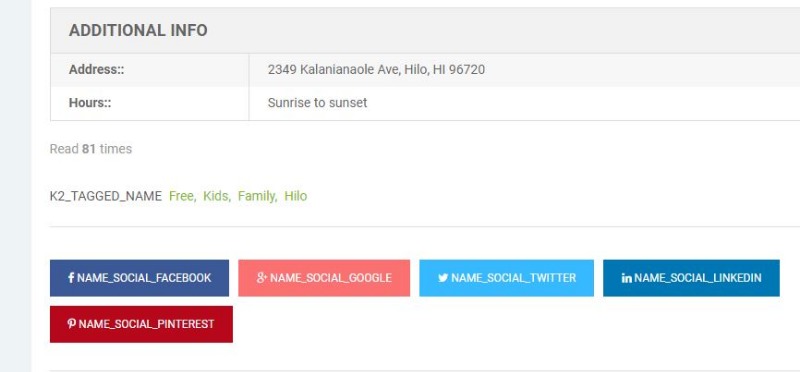
READ_MORE_K2 instead of read more...

Several instances of this. Seems to be displaying the title instead of class?

onbigisland.com
Displaying 541 - 560 out of 6582 results.

Powered by Kunena Forum