Keyword

Advanced Search

Search Results (Searched for: k2 Tag)

  • Buy Lei D (買呢D)
  • Buy Lei D (買呢D)'s Avatar
31 Oct 2014 09:34
Replied by Buy Lei D (買呢D) on topic K2 comments default setting

K2 comments default setting

Category: English K2 Community

Hi,Kris Sibinski. I m other new developer in K2 and I dont think that K2 as spam as you desript.
You may try to set the parameters in Comments tag in backend. And you will find "Global setting for comments" and you can choose who can comment.
  • Atanas Pop-Stefanija
  • Atanas Pop-Stefanija's Avatar
30 Oct 2014 16:47
Full text is not displayed in K2 Item view was created by Atanas Pop-Stefanija

Full text is not displayed in K2 Item view

Category: English K2 Community

Full text is not displayed in K2 Item view.

I have this settings in item view options:
Introtex: Hide
Fulltext: Show

Settings in Item view options in category listings:
Introtext: Show
Introtext word limit: 30

Advanced:
Use one editor window for introtext & fulltext: Yes

Also i have edited file item.php at location \components\com_k2\models\
i change the following line :

if ($item->params->get('catItemIntroTextWordLimit') && $task == 'category')

with following :

if ($item->params->get('catItemIntroTextWordLimit') && ($task == 'category' || $task == 'user' || $task == 'tag' || $task == 'date' || $task == 'search' || $task == ''))


How to display the full text of the article in item view layout?
  • agathon
  • agathon's Avatar
29 Oct 2014 19:14 - 29 Oct 2014 19:15
Replied by agathon on topic K2 Categories block

K2 Categories block

Category: English K2 Community

I downloaded free version of template so they don't provide support. I saw from code that it is a list of categories and subcatagories.

Lefteris Kavadas wrote: You can also set a category to display it's subcategories as a grid.

How i can do that?
  • agathon
  • agathon's Avatar
29 Oct 2014 18:41
Replied by agathon on topic K2 Categories block

K2 Categories block

Category: English K2 Community

See the attached image

Attachment not found


This image is from my template demo.It seems that k2 contains catagories images and tittles in grid view.
  • alona
  • alona's Avatar
29 Oct 2014 18:02
[SOLVED] filter for k2 plugin was created by alona

[SOLVED] filter for k2 plugin

Category: English K2 Community

Hi!

I Installed the "Filter for k2" module and im not sure that I get how it works.
What I need to do is to build a separate form((on a separate menu item)) that would filter my items based on their extra fields and appear as drop down menu.

The issue is: when I'm trying to put the module on a blank page (without any content and no items) the filter fields are not appearing, but when I'm using the module in a page that has some items , the fields showing.

I did the reindex thingy in the module, and followed the exact pdf instructions that I got with the module and nothing is working for me..... HELP.
Or maybe someone has an Idea how can I make a simple filter for my items using tags or extra fields. thanks....
  • Lefteris
  • Lefteris's Avatar
29 Oct 2014 14:45
Replied by Lefteris on topic K2 tools dont search tags

K2 tools dont search tags

Category: English K2 Community

Hi. K2 tools cannot search for tags. The "Search - K2" plugin option concerns the Joomla! search.
  • Lefteris
  • Lefteris's Avatar
29 Oct 2014 14:43
Replied by Lefteris on topic K2 Item TAG selection not working

K2 Item TAG selection not working

Category: English K2 Community

You are welcome.
  • Lefteris
  • Lefteris's Avatar
29 Oct 2014 14:38
Replied by Lefteris on topic Multiple Extra Field Groups

Multiple Extra Field Groups

Category: English K2 Community

Hi. We are currently working on the version 3 of K2 which introduces extra fields for categories, users and tags. The repository of the new version is github.com/joomlaworks/k2-v3-dev-build/ . If your code is based on version 2 of K2 the repository is located at github.com/joomlaworks/k2 .
  • agathon
  • agathon's Avatar
29 Oct 2014 14:37
K2 Categories block was created by agathon

K2 Categories block

Category: English K2 Community

Hi to all (sorry for my English)
I downloaded a responsive free template without containing quick-start package(only for premium version)so i started to build this site from the beginning with the containing extensions.Its one part from template which contain a k2 catagories block ,it shows up only categories titles and images.I can see from code that includes this class=itemListCategoriesBlock.i've tried to add in the menu item type->k2 item or categories but with no success.I dont know if it is some settings or smth from code.

I dont know if i can post a link for this template or from my site but i would appreciate any help how to build this part with K2
  • MiloW
  • MiloW's Avatar
28 Oct 2014 16:13 - 28 Oct 2014 17:10
Replied by MiloW on topic What's with the image auto resizing?

What's with the image auto resizing?

Category: English K2 Community

Well, I've read about these sizes and this sounds idiotic to me. There is no option like "default" in the panel.

The guys at SP wrote to me that it isn't SP Upgrade for sure and I'd agree with it as articles, when shown in the panel, have images in normal width.

EDIT:
GOT IT!!!!!!!!!!!!!!!!!!!!!!!!

It was
div.groupLeading div.itemBody img,
div.groupLeading div.userItemList img,
div.groupLeading div.catItemBody img,
div.groupLeading div.tagItemBody img,
div.groupPrimary div.itemBody img,
div.groupPrimary div.userItemList img,
div.groupPrimary div.catItemBody img,
div.groupPrimary div.tagItemBody img,
div.groupSecondary div.itemBody img,
div.groupSecondary div.userItemList img,
div.groupSecondary div.catItemBody img,
div.groupSecondary div.tagItemBody img,
div.latestItemBody img {
width: 100% !important;
margin-top: 10px;
}
and it was Joomlashine external css for K2 : )
  • Montse
  • Montse's Avatar
28 Oct 2014 13:55
K2 tools dont search tags was created by Montse

K2 tools dont search tags

Category: English K2 Community

Good Morning,

I am currently using joomla 2.5 and K2 V2.6.7.

Jobs in portal to add content to a number of publishers from the front, into articles.

Use k2tools searching, because I need to conduct searches only within certain categories.

Now, I seek to add tags to items they create with the idea of improving the search, and although the labels are created and displayed correctly (label looks like: xxx, within the articles), I can not get k2tools perform the search within those tags.

In Search - K2 Plugin have enabled tag search.

I tried to change, remove, modify tags .... but I can not search a tags .

Does anyone know how to fix it?

Thank you in advance.
  • Vlad
  • Vlad's Avatar
28 Oct 2014 13:54
Replied by Vlad on topic K2 Item TAG selection not working

K2 Item TAG selection not working

Category: English K2 Community

I disabled jQuery Easy and it worked. Not sure why it was causing conflict. Thanks for the help.
  • Vlad
  • Vlad's Avatar
28 Oct 2014 05:00
Replied by Vlad on topic K2 Item TAG selection not working

K2 Item TAG selection not working

Category: English K2 Community

Hi,

I am using K2 version 2.6.8.

The error I see is:

TypeError: $K2(...).accordion is not a function

Thanks
  • weiyangliao
  • weiyangliao's Avatar
27 Oct 2014 16:48

How to modify the titles of the contact forms?

Category: Commercial Joomla Templates

See the red rectangle in the attached pics.

1.How to modify the titles of this contact form?
2.I found contacts and modified them but I can not add a new contact and use it here. I can only modify the old one. What should I do?
teahouse.meimen.com/index.php/contact
imgur.com/F7AOSpl


3.How to modify the titles of this contact form?
4.There is a flickr error tag. How can I correct it?
teahouse.meimen.com/index.php/using-k2/item/279-cloth-and-accessory
imgur.com/H3OtDug
  • Lefteris
  • Lefteris's Avatar
27 Oct 2014 14:32
Replied by Lefteris on topic K2 Item TAG selection not working

K2 Item TAG selection not working

Category: English K2 Community

@Vlad

Which K2 version are you using? Check the browser console for any errors.
  • Vlad
  • Vlad's Avatar
26 Oct 2014 06:26
Replied by Vlad on topic K2 Item TAG selection not working

K2 Item TAG selection not working

Category: English K2 Community

Hi,

K2 tag selection is not working form the fronted for me.

Was this issue resolved earlier?

Please help.

Thanks
  • Dragan Todorovic
  • Dragan Todorovic's Avatar
26 Oct 2014 02:29
K2sitepath var removed but requred was created by Dragan Todorovic

K2sitepath var removed but requred

Category: English K2 Community

K2sitepath var has been removed from admin/item edit view

K2_v2.6.8.zip\administrator\components\com_k2\views\item\view.html.php

prntscr.com/4zr8f0
but it is required in order to get the list of existing tags

K2_v2.6.8.zip\media\k2\assets\js \k2.js
prntscr.com/4zr8x1

start typing in item edit view for an existing tag and you will see

prntscr.com/4zr9qk
  • baggiesmad
  • baggiesmad's Avatar
24 Oct 2014 12:46
Replied by baggiesmad on topic Is it possible to create a Job board using K2?

Is it possible to create a Job board using K2?

Category: English K2 Community

Krikor Boghossian wrote: Yes, with extrafields and specific tags to handle all the extra lists you need.


Hi

Is it possible to add extra fields with the default component? or do I need additional modules / plugins?
  • giusy
  • giusy's Avatar
24 Oct 2014 01:47
portfolio k2 was created by giusy

portfolio k2

Category: Comunità italiana K2

Ciao, sono una neofita di joomla, e sono alle prime armi. Sto"settando il portfolio" con k2 e non riesco a capire come modificare le voci sulla sx (ovvero i dettagli progetto) dal pannello di controllo. Non credo debba apportare modifiche al file portfolio.php?! Qualcuno può spiegarmi inmodo molto semplice come creare e gestire quelle voci di dettaglio? in allegato l'esempio.
Grazie mille a tutti!

Attachment not found

  • Bruno
  • Bruno's Avatar
23 Oct 2014 20:14
Replied by Bruno on topic K2 is adding "/" to my images URLs

K2 is adding "/" to my images URLs

Category: English K2 Community
Thanks for your answer.

I didn't use any button, at the beggining i inserted a module for a slideshow with {loadposition myposition} but none of the images were displayed.

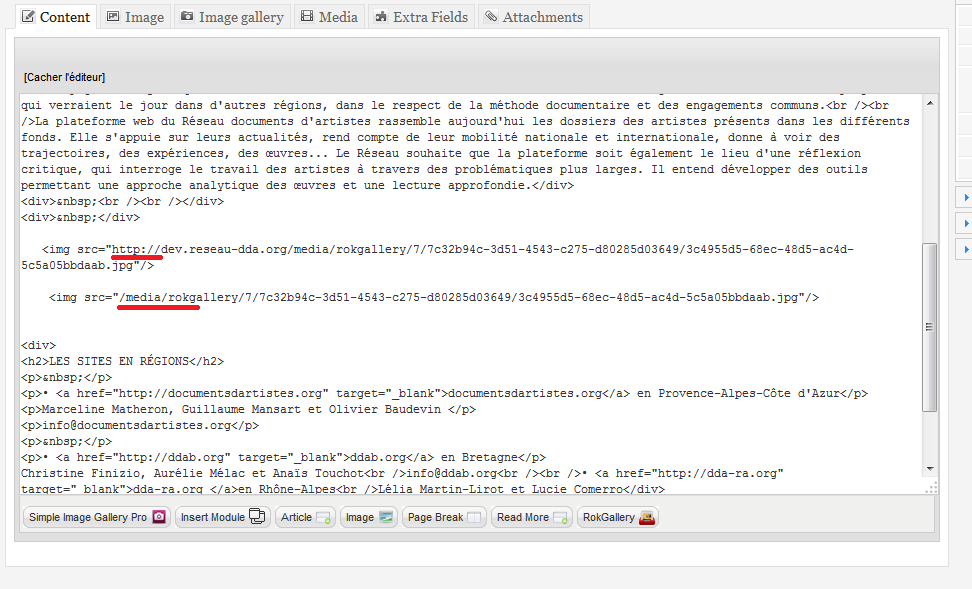
So i tried to add images in the item with the html tag <img> to see where was the problem and i saw that K2 was actually adding a "/" in their URL in src.

For example i wrote this :


And it become this :


And i don't know why K2 is doing it.
Displaying 2221 - 2240 out of 6582 results.

Powered by Kunena Forum